Inspiring
September 14, 2021
Answered

numerical sum of text fields

  • September 14, 2021
  • 3 replies
  • 2288 views

My first post! I am looking to have my text fields each be worth 1 point, so when they fill out the field it adds into my sum.  I cannot see a way to have my text field be fillable but still have a value? thanks for any help 


Correct answer natel55306293

I ended up with the code below, which works really well, as the code at the top seemed to place the number 1 in each one of my text boxes at the start, thanks for all your help!


var fields = ["Text1", "Text2", "Text3", "Text4", "Text5", "Text6", "Text7", "Text8", "Text9", "Text10", "Text11", "Text13", "Text14", "Text15", "Text16", "Text17", "Text18", "Text19", "Text20", "Text21", "Text22", "Text23", "Text24", "Text25", "Text26", "Text27"];

var count = 0;

for (var i=0; i<fields.length; i++) {

var f = this.getField(fields[i]);

if (!/^\s*$/.test(f.valueAsString)) count++;

}

event.value = count;

3 replies

Participant
April 4, 2025

I am trying to use this formula twice on a page to calculate separate totals of 2 different sets of data (number of "yes" answers and number of "no" answers.) It works for the yes column but if I duplicate it and replace the variables with the field names for the no column it doesn't work. Does something else need to change in the code so it calculates both totals?
this works:

var fields = ["Y1", "Y2", "Y3", "Y4", "Y5", "Y6", "Y7", "Y8", "Y9", "Y10", "Y11", "Y12", "Y13", "Y14", "Y15", "Y16", "Y17", "Y18", "Y19", "Y20", "Y21", "Y22", "Y23", "Y24", "Y25", "Y26", "Y27"];

var count = 0;

for (var i=0; i<fields.length; i++) {

var f = this.getField(fields[i]);

if (!/^\s*$/.test(f.valueAsString)) count++;

}

event.value = count;

this does not:

var fields = ["N1", "N2", "N3", "N4", "N5", "N6", "N7", "N8", "N9", "N10", "N11", "N12", "N13", "N14", "N15", "N16", "N17", "N18", "N19", "N20", "N21", "N22", "N23", "N24", "N25", "N26", "N27"];

var count = 0;

for (var i=0; i<fields.length; i++) {

var f = this.getField(fields[i]);

if (!/^\s*$/.test(f.valueAsString)) count++;

}

event.value = count;

try67
Community Expert
Community Expert
April 4, 2025

Change this:

if (!/^\s*$/.test(f.valueAsString)) count++;

To:

if (f.valueAsString=="yes") count++;

Or:

if (f.valueAsString=="no") count++;

Inspiring
September 15, 2021

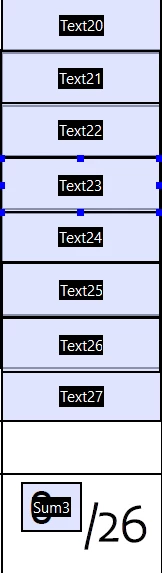
Last field in your photo is 27 and your sum is 0/26, how many fields you have and how are they named?

Inspiring
September 15, 2021

Thanks for all the helpful ideas! There are 26 fields (I just had to remove #12) thus 27. They are named Text1, Text2 etc

I also found this code below, but it means entering a list of all of the text boxes so im wondering if the code above is easier?

var fields = ["C10", "C20", "C30", "C40", "C50", "C60", "C70", "C80", "C90", "C100", "C110", "C120", "C130", "C140", "C150", "C160", "C170", "C180", "C190", "C200"]; 

    var count = 0; 

    for (var i=0; i<fields.length; i++) { 

        var f = this.getField(fields[i]); 

       if (!/^\s*$/.test(f.valueAsString)) count++;

    } 

    event.value = count; 
try67
Community Expert
Community Expert
September 15, 2021

You can use this code as the custom calculation of your sum field, then:


var total = 0;
for (var i=1; i<=27; i++) {
	var f = this.getField("Text"+i);
	if (f==null) continue;
	if (f.valueAsString!="") total++;
}
event.value = total;
ls_rbls
Community Expert
Community Expert
September 15, 2021

You can try this in different ways using Acrobat JavaScript.


In my example below I declared a default value of "1" for each field that I want to add to my sum calculation. See slide below:


Then add the script below to your "Sum3" texfield as a custom calculation script:


event.value = 0;

  sum = 0; 
  for (var i=0; i<8; i++) {
  var f = "Text2";
  var v = this.getField(f+i);

  if (v.valueAsString !=="") {

  sum += v.defaultValue
  event.value = sum;

  }
}


 NOTE: in this line  for (var i=0; i<8; i++) , specifically this part: "i  < 8"


Based on your screen shot,  you have a total of eight textfields and they all are in the range from 20  to 28.


If you have more than 8 text fields that you wish to add to your sum operation, you must declare that total in the line indicated on my note above. Otherwise  this script won't work with the "for loop" operation.


For example, if you have a total of 19 textfields  you must indicate "i < 19".


And if that would be the case,  consider working around the field name in this variable:  var f = "Text2".


In which case, if you have textfield names in the range of "Text10" overlapping with those in the range of 20 (all the way up to  "Text28"), then  variable "f" (in my example script above) must be declared slightly different or come up with a different SUM script.


try67
Community Expert
Community Expert
September 15, 2021

I think they basically just want to count the number of fields that are filled-in, with any value, not sum them up as numbers. So applying "1" as the default value is not going to work...

try67
Community Expert
Community Expert
September 15, 2021

Ah, I see you're using that in your code to count the fields, which will work, but is not really needed. Why not simply increment the value of sum by 1, and leave the default value empty? The problem with setting it as "1" is that if the user clears the form all of these fields will revert to that value...