
Participant
September 10, 2024
Question

OCR changing look of document

  • September 10, 2024
  • 1 reply
  • 258 views

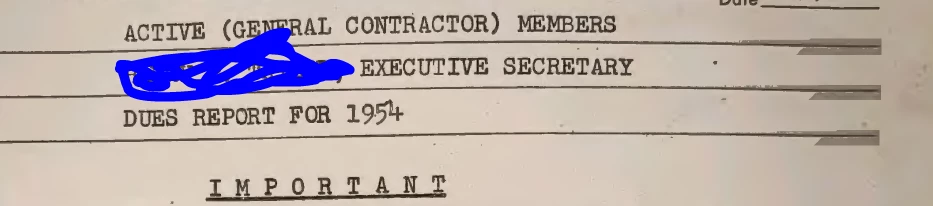
I OCR all of my documents and I haven't really noticed this issue until today. After the OCR is run, I do not look at the results, so there's no overlay on. The PDF should essentially look the same as before the OCR process. However, there are these gray bars on top of a couple of lines that do not have text. Why do these appear? What else is it altering? Picture attached.
1 reply

S_S
Community Manager
Community Manager
February 3, 2025

Hi @laura_4187,


Hope you are doing well. Sorry for the trouble, and the delayed response.


1. Background Artifacts or "Invisible" Layers
  • OCR software often creates hidden layers or backgrounds behind the recognized text to help with positioning and alignment. These layers could be semi-transparent or altered during the OCR process, leading to the appearance of gray bars over areas with no text.
  • These bars could be an artifact of the software trying to position or "mask" content in the document.
2. Text Recognition Errors
  • If the OCR process struggles to correctly identify text, it might leave behind some elements (like shaded regions or bars) where it wasn’t sure what to recognize, or it might add extra elements where it detects inconsistent characters or spacing.
  • These can sometimes be accidental “corrections” from the software, causing visual disruptions like gray bars.
3. Layering Issues
  • Some OCR tools layer recognized text over the original image, and if it’s not perfectly aligned, it could lead to visual artifacts, like those gray bars appearing over certain areas without text.
  • Depending on the settings, the OCR tool could also add invisible "tags" or background regions that don't display any text but affect the overall layout.


Hope this helps.


-Souvik