
Participant
Jul 26, 2021 1:18 PM UTC
Answered

OCR Skews Page

I scan documents here regularly so that pdf files of hard copies can be readily accessed company wide.  My scanner (either the Xerox 6204 Wide Format or Cannon C5235A) creates pdf files automatically, so I run OCR (recognize text in multiple files) on my scanned images to render searchable text.  My problem is OCR is regularly skewing pages based on images within the line drawings that I scan, often causing the document number/revision block of the drawing to run off the page.  Is there a means to set the OCR preferences when one utilizes the option Recognize text in multiple files?

This topic is closed to new replies. Start a new post to keep the conversation going.
gary_sc
gary_scCorrect answer
Community Expert
Jul 26, 2021 3:47 PM UTC

Hi Ellbie,


OK, this is a bit burried but fairly straightforward.


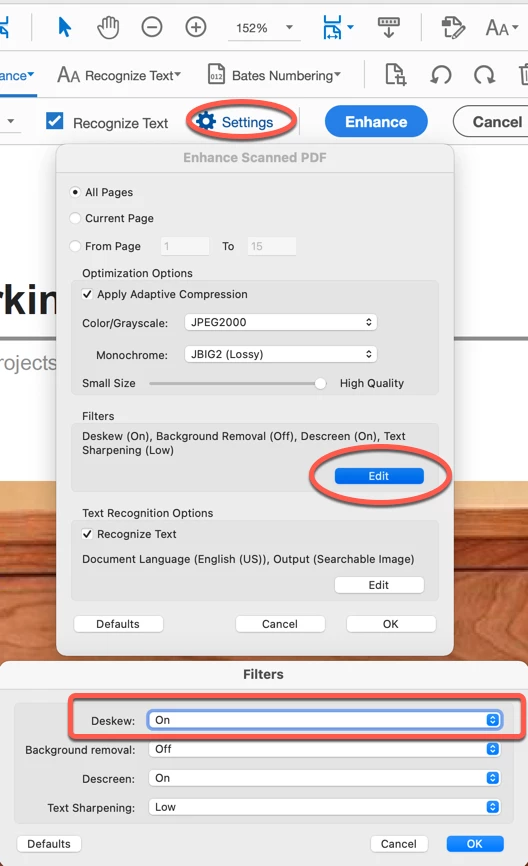
Go into the Scan & OCR Toolset. I've marked the sections you need to adjust in red.


From the top, click on Settings, this will open the Enhance Scanned PDF window. 

Then about 2/3rds the way down you'll see the Filters option, click on the Edit button

Here, the very top Filter is Deskew, it's default is on, change that to Off, 


Close everything back up and please let us know this works for you. 


BTW, you will have to undo this if you're scanning a regular text document becuase it's better that this is on for regular documents as any skewing in text can affect the quality of the OCR.


4 replies

gary_sc
Community Expert
gary_scCommunity ExpertCorrect answer
Community Expert
Jul 26, 2021 3:47 PM UTC

Hi Ellbie,


OK, this is a bit burried but fairly straightforward.


Go into the Scan & OCR Toolset. I've marked the sections you need to adjust in red.


From the top, click on Settings, this will open the Enhance Scanned PDF window. 

Then about 2/3rds the way down you'll see the Filters option, click on the Edit button

Here, the very top Filter is Deskew, it's default is on, change that to Off, 


Close everything back up and please let us know this works for you. 


BTW, you will have to undo this if you're scanning a regular text document becuase it's better that this is on for regular documents as any skewing in text can affect the quality of the OCR.


Translate
Participant
Jul 26, 2021 4:13 PM UTC

Thanks Gary.


I managed to find the choices that you have in your image.  They don't appear at all when running 'Recognize text in multiple files'.  I had to open a multi-page pdf file, click on the Scan and OCR tool, and select Enhance instead of Recognize Text.  Hopefully, that selection sticks.  I will respond if I still have issues with skewing in the future.


Tom


Translate
Participant
Sep 7, 2023 11:20 PM UTC

I am having this issue with Adobe 2020 and that setting did not fix the problem.

Translate