
Odd boxes when editing PDF that was printed using Acrobat PDF printer
Hello! I'm an IT tech in a small company and today one of my users came to me with a strange print-to-PDF related problem. Using the Adobe PDF printer, she printed a weekly internal report from the new Chromium version of Microsoft Edge and found that when she went to edit the PDF in Acrobat Pro to add a date, strange boxes appeared all over the document. Since this report was company sensitive, I had her try again with Google(dot)com (so we could get something safe to share and to try a different site) and got similar results:
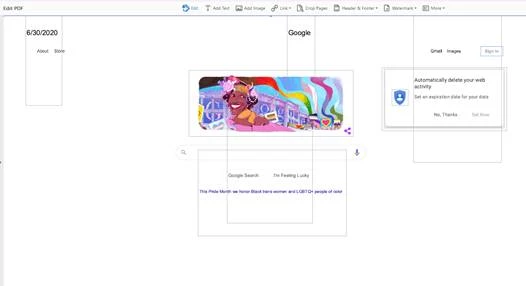
I am not an Adobe expert by any means, but I believe the boxes are from Acrobat trying to interpret text on the PDF for editing, correct? The issue is far more egregious on the report site, such that the report is almost useless, but I can't share that for sensitivity reasons.
To try and narrow down the issue, we tried printing Google(dot)com using an alternative PDF printer (Microsoft print to PDF) and a different browser (Firefox, using the Adobe PDF printer). Both results look far more normal:
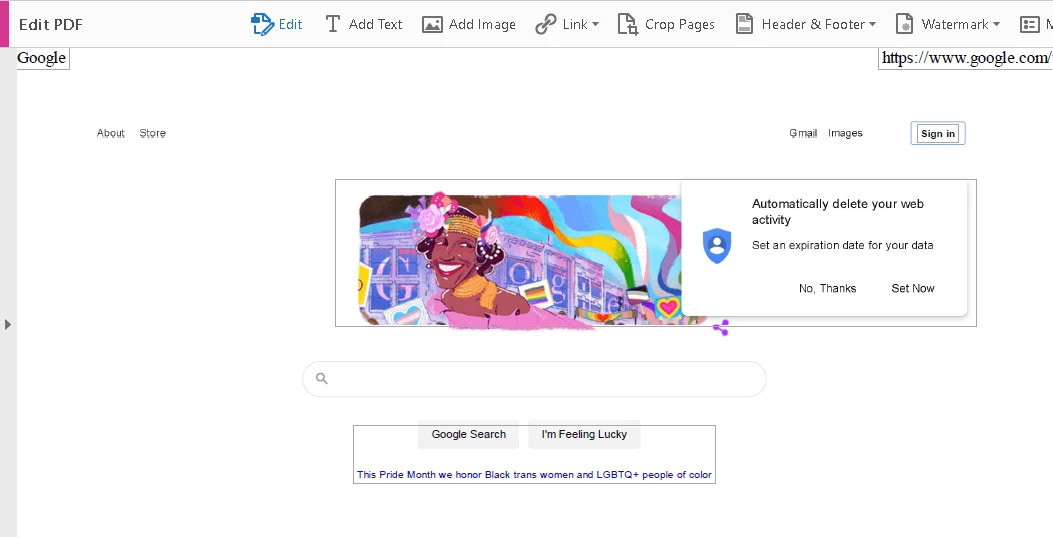
Firefox using Adobe PDF printer
I had a different user with access to Acrobat Pro try the same set of tests and they found they had the same issue: normal behavior in Firefox and/or using Microsoft print to PDF, but odd behavior in Chromium Edge with Adobe PDF printer. For grins, I had this other user try Google Chrome as well and it, too, gave strange boxes.
Has anyone else experienced this and know a fix? We have a workaround in place to use the Microsoft print to PDF printer, but we'd like to correct the problem if possible. Thanks!
 AdChoices