
Participant
September 21, 2021
Question

On MacOS/Citrix with dual monitors, Adobe doesn't respect preferred monitor choice

  • September 21, 2021
  • 1 reply
  • 404 views

Running Adobe and other Windows applications in a corporate Citrix/Windows Server environment.


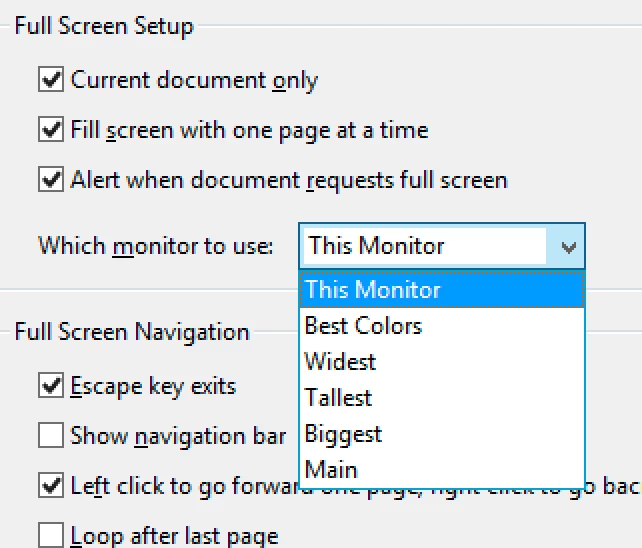
I am unable to have Acrobat consistently open on my monitor 2 (external).  Through rote repetition of dragging the window from monitor 1 to monitor 2 (possibly 10-20 times) it will eventually start opening on monitor 2.  Works well until circumstances (such as Zoom presentation) require that I drag the window to monitor 1.  From this point on, it's back to monitor 1. Rinse and repeat. Acrobat doesn't seem to respect this monitor preference, or is there another setting that I need?  See screen snippet below from Preferences (Ctrl-K)


This topic has been closed for replies.

1 reply

Adobe Employee
September 23, 2021

Hi,


Thanks for reaching out to us and sorry for the issue faced at your end. We are checking this issue at our end. In the meanwhile, for macOS, another option is available in Acrobat and Reader to switch monitor screens.

Open app> Window in top menu> Move to [Other monitor's name]

Please give it a try and let us know if it solved your problem.


Thanks

shrebhat@adobe.com

Participant
September 29, 2021

Thanks, but that doesn't really resolve my issue. I'm familiar with the window swap functionality in MacOS, but I sometimes open and manipulate dozens of Adobe files, one at a time, and repeatedly having to manually force to the other monitor just slows me down.