Inspiring
September 13, 2024
Answered

One Javascript in PDF Form that I can't get to work

  • September 13, 2024
  • 3 replies
  • 733 views

I have a form with quite a few simple calculations that I have working perfectly but for one calculation that I can't get to work.  It's too complicated for me to figure out.  It's the script for 'TF64' (TextField64).


The original formula is from an Excel file, and it looks like this:



The translated JavaScript with my substituted PDF text fields (TF#s) looks like this:

(((TF34>0)&&(!TF79)||TF79<1)&&((TF49/TF15)>86.6||!TF49))?86.6:(TF49/TF15))



The section of the PDF form showing the location of the text fields are here:
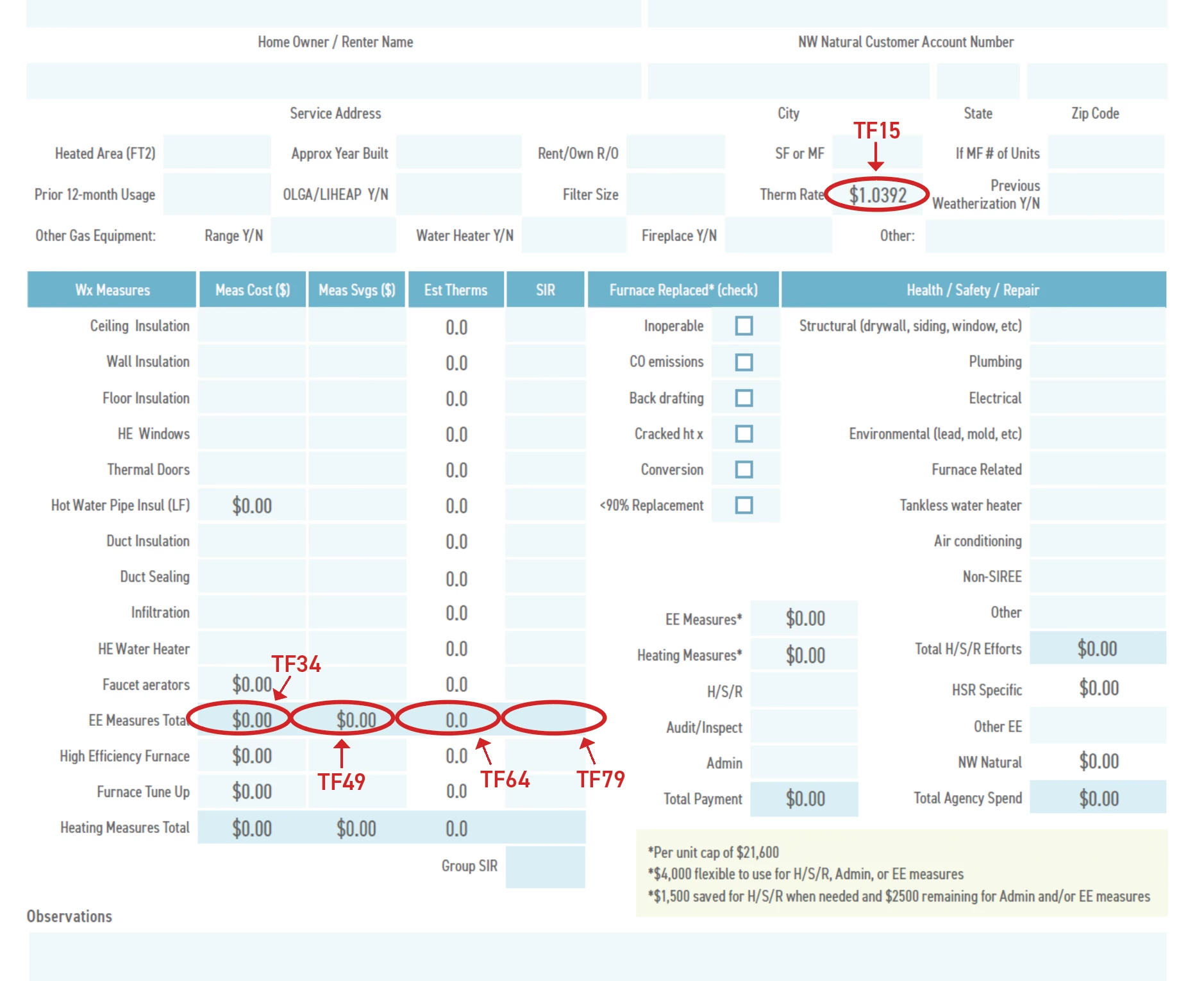


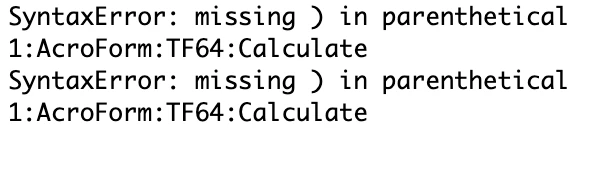
I'm not a coder at all, but I ran the debugger and this is what it showed for that script:


I'm attaching the PDF form as well.  Hopefully someone can guide me through this without too much effort.  Many thanks, if so!


This topic has been closed for replies.
Correct answer Nesa Nurani

You can't enter script in simplified field notation, you need to use custom calculation script, like this:

var f = this.getField("TF35").valueAsString;
event.value = (f == "") ? 0:22;

3 replies

Participant
October 25, 2024


looks like you are almost there man! The main issue could be with your logical operators and parentheses. Try adding explicit parentheses around each condition to be sure they're evaluated in the correct order. For case:


javascript
Copy code
(((TF34 > 0) && (!TF79 || TF79 < 1)) && ((TF49 / TF15) > 86.6 || !TF49)) ? 86.6 : (TF49 / TF15)
 

If it is still not working after this, double-check that each variable has a value assigned when the calculation runs, as undefined values can cause issues.

Nesa Nurani
Community Expert
Community Expert
September 14, 2024

Use this as a custom calculation script and see if it works for you:

var B28 = Number(this.getField("B28").valueAsString); // Replace with actual field names
var C28 = this.getField("C28").valueAsString;
var E28 = this.getField("E28").valueAsString;
var H12 = Number(this.getField("H12").valueAsString);

var result = 0;

if (B28 > 0 && (E28 === "" || Number(E28) < 1) && (C28 === "" || (H12 !== 0 && (Number(C28) / H12) > 86.6))) {
 result = 86.6;} 
else if (C28 !== "" && H12 !== 0) {
 result = Number(C28) / H12;}

event.value = result;
Inspiring
September 14, 2024


Thank you SO MUCH, Nesa!  Yes, it works perfectly!  I had already texted out the calculation (in layperson terms) 😉 and sent it to corporate to get their approval before posting it here, but approvals from corporate take days, so you just saved us a lot of time.  Thanks again!


I have just one additional question on this form that I’m hoping you can help with:


In this image, you can see the Excel file at left and the formula for cell B29 at top, and below that, cell B29 is blank, and the affected cell on the right is 0.  Below that, B29 is set at 1 and affected cell at right is 22.


One the right side of the image, you see the corresponding formula and cells in the PDF Form.  However, in the PDF form, if I leave the same cell blank, (as in the Excel file) the affected cell on the right has been activated and is 22.  It’s only if I prepopulate that cell with a 0 that it behaves properly and the affected cell on the right remains 0, as shown in the bottom image.


Is there a way to adjust the field notation in the PDF form so that if the cell is blank, the affected cell on the right will remain 0?


And, one last question: do you personally offer code translation help (particularly translating Excel formulas to Acrobat-friendly scripts) as a business?  Possibly a website we can go to for help?


Nesa Nurani
Community Expert
Nesa NuraniCommunity ExpertCorrect answer
Community Expert
September 14, 2024

You can't enter script in simplified field notation, you need to use custom calculation script, like this:

var f = this.getField("TF35").valueAsString;
event.value = (f == "") ? 0:22;

PDF Automation Station
Community Expert
Community Expert
September 14, 2024

The SyntaxError means you are missing a closing bracket.  The number of opening brackets ( and closing brackets ) has to match.  Your are also trying to write a conditional statement in a simplified field notation.  You can't do that.  This should be in a custom calculation script.  If you explain exactly what you are trying to calculate I will try to help you.