
Participant
July 16, 2025
Question

OneDrive not connecting to Mac app but connected to web version

  • July 16, 2025
  • 1 reply
  • 337 views

Hi,


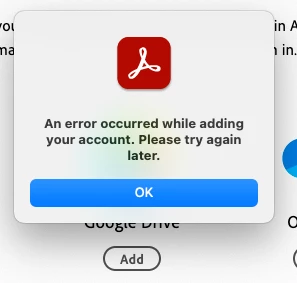
I have been able to connect my work OneDrive to Adobe Acrobat online (browser), but when I try to connect it to the desktop app on Mac, I am getting an error. (See screenshot below)


Some FYIs

1. I am signed to the same account on both the web and desktop versions.

2. I am using OneDrive for business since it is a work account.

3. My Adobe account is also a work account.

4. It doesn't seem to want to sync.

5. I have uninstalled and reinstalled the desktop app. There were no updates available before doing this.


If I am able to connect OneDrive via the web browser version of Acrobat, then I have all of the permissions.


Thanks for your help in advance. I'm testing this out to help an instructor at my institution.
 

1 reply

Dave Creamer of IDEAS
Community Expert
Community Expert
July 16, 2025

I was able to log into both my person and enterprise accounts*. 

The basics (sorry): check the spelling of your loging and password; and the case of the password. 

(I use Microsoft Authenicator instead of passwords for my OneDrive's, so I don't know if that was an issue.)

Check permissions of your access to the OneDrive.


These are all guesses...


*I have the OneDrive desktop app installed so I never needed to log in directly in Acrobat.


David Creamer: Community Expert (ACI and ACE 1995-2023)
sdenham82Author
Participant
July 16, 2025

Hi. 
We use an authenticator with my organization, so it's automatic. However, when I meet with the instructor, I will check if she has OneDrive downloaded on her device (I do). That should be a good workaround.


Thanks!!

Meenakshi_Negi
Legend
July 16, 2025

Hi sdenham82,


Thank you for reaching out, and sorry about the trouble caused. 


Please try adding any other cloud account and see if that works. Ensure that you are using the latest version of the application. To check the latest updates available for the application, refer to the following help document: https://adobe.ly/40SpDIg


Please use the steps as suggested in the following help document: https://adobe.ly/46dzEDB

If you still experience any issues, try reinstalling the application using the following steps:
- Remove the application and run the cleaner tool (https://adobe.ly/469liEb).
- Reboot the machine
- Install Adobe Acrobat Reader from the following page: https://adobe.ly/44zNZsL;


Feel free to let us know if you need any help.


Thanks,

Meenakshi