

Anton Shcherbinin
Participant
November 19, 2020
Question

opacity of comment is low

  • November 19, 2020
  • 1 reply
  • 1041 views

Adobe Acrobat Pro DC - ver.2020.013.20064 (19.11.2020)


1. Add text comment.

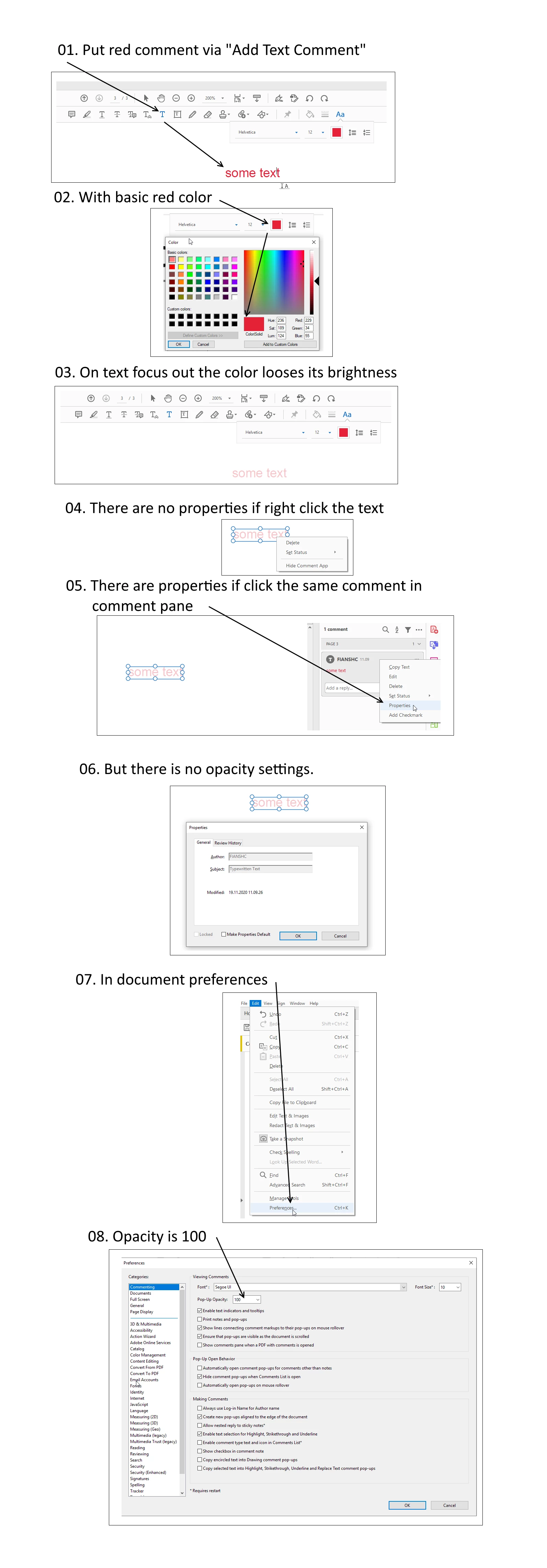
2. While text typing the opacity is 100% - that is good.

3. When text is focused out / blurred the opacity becomes lower (around 50%).

4. When print the page comments are barely visible.


Any idea how to fix?
 

This topic has been closed for replies.

1 reply

Amal.
Legend
November 20, 2020

Hi Anton


Hope you are doing well and sorry for the trouble. As described, while typing the text comment the opacity is 100% and then it blurs to 50%


Please try to open an old document that you had previously included text (with all other documents closed), opening the comment tab (where it lists the comment history), clicking on a comment in the list that did have full opacity, right click, select properties, and check the box for Make Properties Default, and then save the document. 


For more information please look at the similar discussion https://community.adobe.com/t5/acrobat/changing-opacity-of-comment-text/td-p/9848758?page=1#M253796


Hope it will help


Regards

Amal

Anton Shcherbinin
Participant
November 20, 2020

Dear Amal, thanks for your comment, but unfortunately no luck.

Tried several times as instructed.

You can check that the text is still vague in the link and there is no settings for its opacity - example.pdf