Participant
February 3, 2021
Answered

Open a website in PDF reader

  • February 3, 2021
  • 3 replies
  • 2673 views

Is it possible to open any website in dialog box or right pane inside Adobe reader or DC using Javascript SDK.? just like we open a website in IFrame inside another webapplication.

    This topic has been closed for replies.
    Correct answer JR Boulay

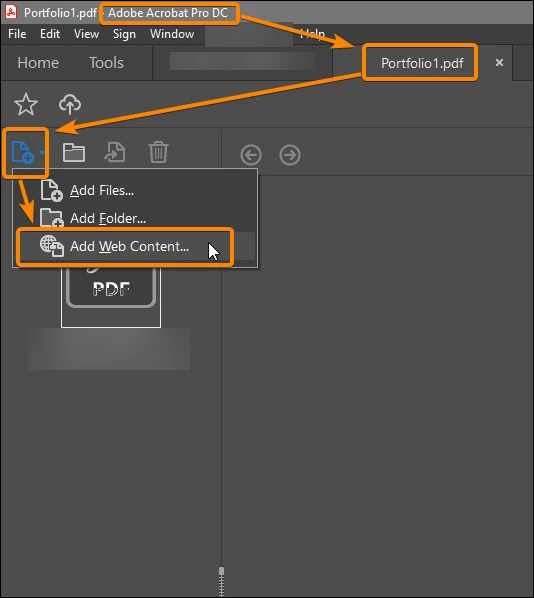
    Yes, but not in a regular PDF file, this requires a PDF Portfolio.

    You need Acrobat Pro to create it but it can be used with Acrobat Reader.


    3 replies

    JR Boulay
    Community Expert
    Community Expert
    February 5, 2021

    Yes, it's a live page but, but… you know the Acrobat'UI as me…


    To be live the Web content must be added AFTER the creation of the Portfolio, using the local menu as shown on my screenshot.

    And yes, if you add an HTML page when creating the Portfolio it will be converted to PDF.


    Great feature, isn't it?

    😉


    See this sample portfolio, showing an animated HTML page made by Jean-Claude Tremblay with InDesign an published with PublishOnline (an InDesign feature).

    Click the rocket to start, it's about all typographical blank spaces available in InDesign:

    https://documentcloud.adobe.com/link/track?uri=urn:aaid:scds:US:d7574943-c85a-4446-bdd1-16e29b896444


    Acrobate du PDF, InDesigner et Photoshopographe
    try67
    Community Expert
    Community Expert
    February 5, 2021

    I never seen that before... Wow, what a strange feature, and in such a strange location.


    Thanks for letting us know about it! I learned something new.

    JR Boulay
    Community Expert
    Community Expert
    February 5, 2021

    It's a very useful feature for trainers, I always give training assets and materials to attendees in a PDF Portfolio.

    So tutos, infos, etc. are always up to date, unlike the conversion to PDF which freezes them in time. 

    Acrobate du PDF, InDesigner et Photoshopographe
    JR Boulay
    Community Expert
    JR BoulayCommunity ExpertCorrect answer
    Community Expert
    February 3, 2021

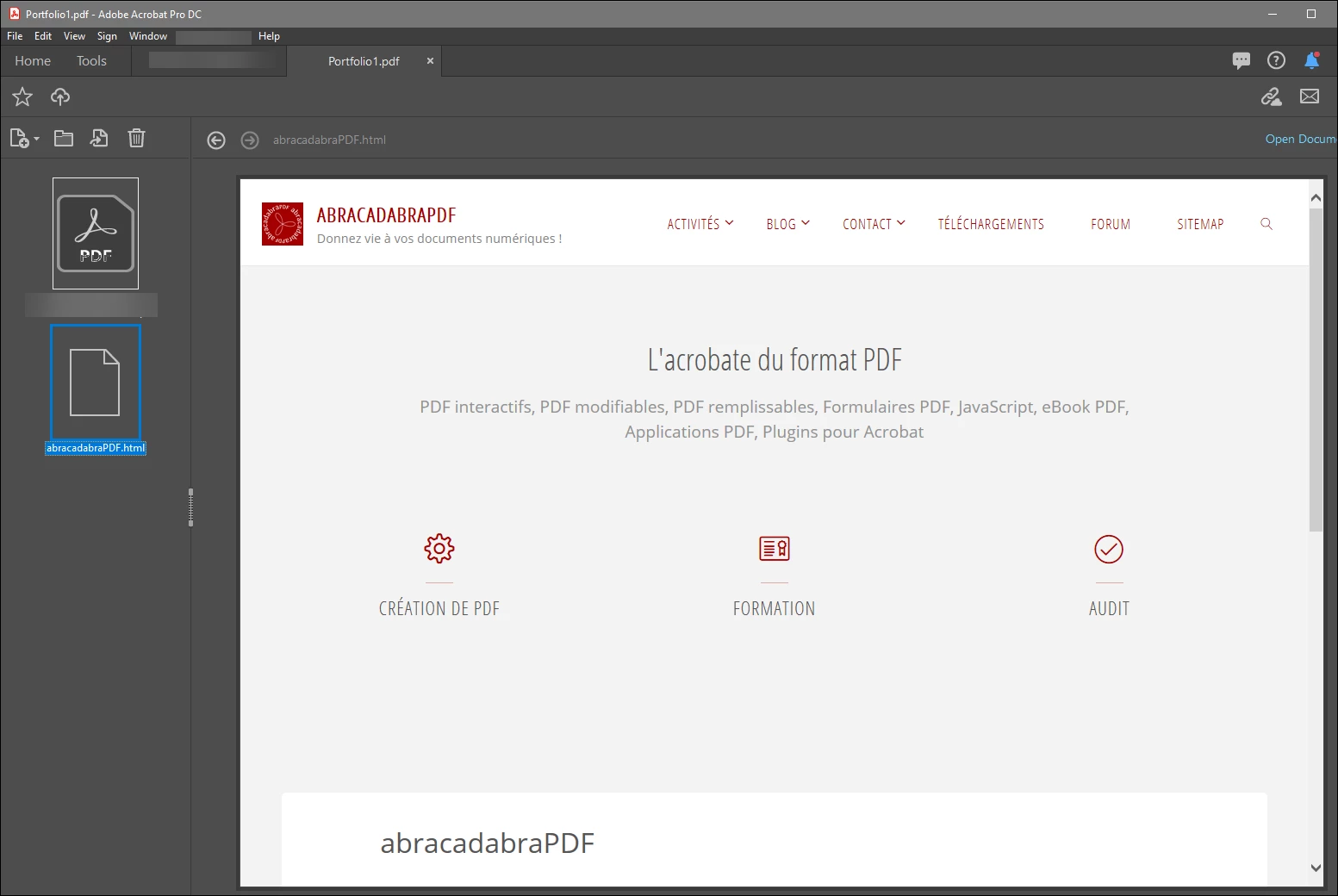
    Yes, but not in a regular PDF file, this requires a PDF Portfolio.

    You need Acrobat Pro to create it but it can be used with Acrobat Reader.


    Acrobate du PDF, InDesigner et Photoshopographe
    try67
    Community Expert
    Community Expert
    February 3, 2021

    This is just converting a web-page to a PDF. It's not a "live" web-page, as what they seem to be asking for.

    try67
    Community Expert
    Community Expert
    February 3, 2021

    No.

    Participant
    February 8, 2021

    Hi, 

    I am been in the same situation I also want to access an external web page say example (www.google[dot]com) in acrobat (in a dialog box or some kind of panel). I have gone through the javaScript API reference but couldn't found anything(except launchUrl which opens the website outside acrobat). Is it possible through C/C++ in plugin development to achieve so? need a lead/help to proceed further.

    Thanks