Participant
April 18, 2023
Answered

Open documents in separate windows.

  • April 18, 2023
  • 16 replies
  • 15325 views

My Acrobat Pro must've just updated, and I am no longer able to choose to open documents in seperate windows.  This option appears to have disappeared from the preferences.  Does anyone know how this can be switched back on?  I cannot stand having to view docs in tabs within the same window.  the version is 2023.001.20143 for MAC.

Correct answer Tariq Dar

With Cascade, you'll need to select it each time as opposed to the documents opening in separate windows as before? Thanks.


Hi all, 

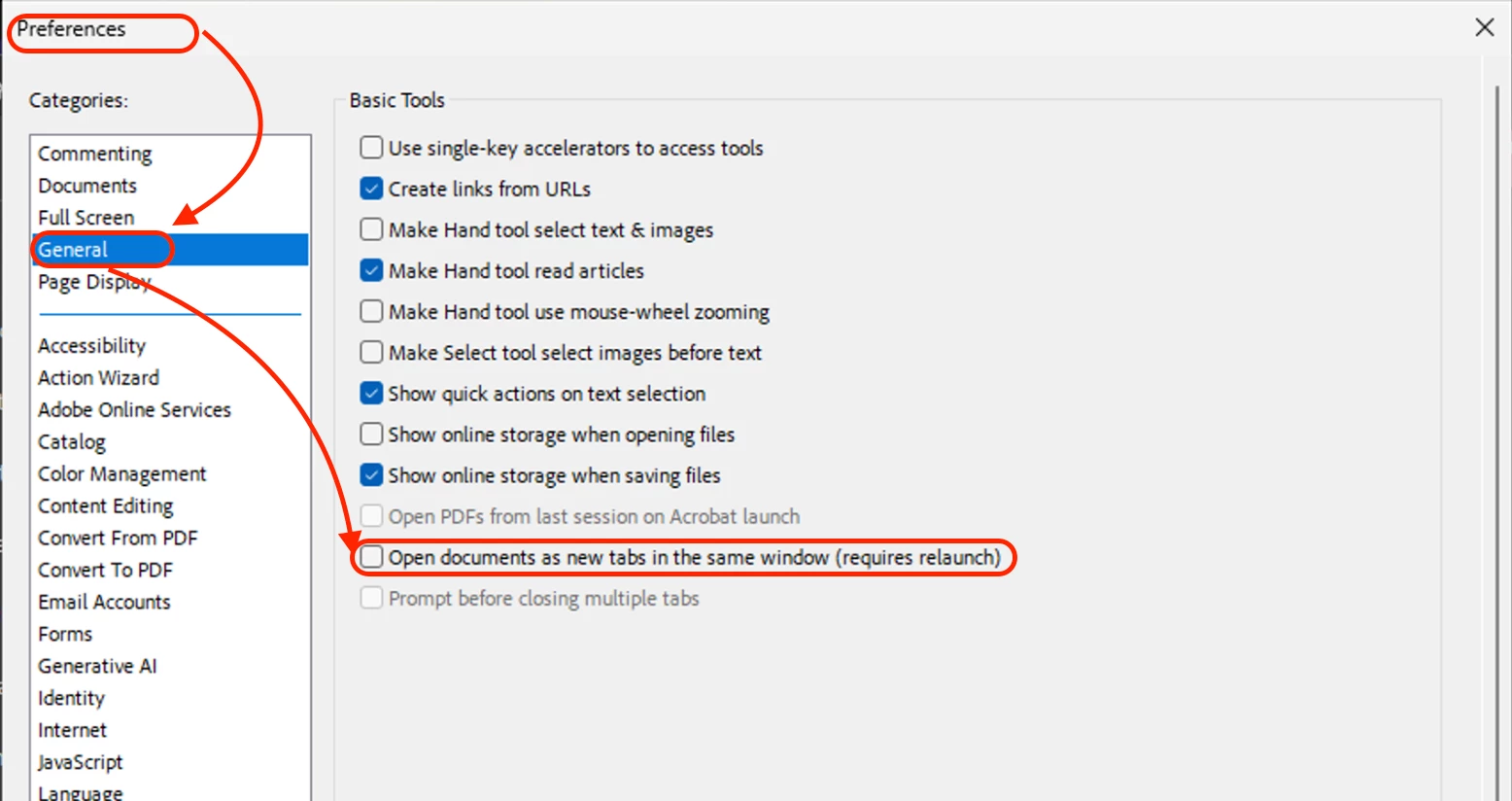
This is to update you that the feature is available in Acrobat now. If it is disabled, please check this preference.

The preferences settings control how the application behaves whenever you use it; they are not associated with any particular PDF document.

1. To access the Preferences dialog, choose the hamburger menu(Windows) > Preferences or Acrobat / Adobe Acrobat > Preferences (macOS).
2. In the Preference's dialog box's left pane, select General, then uncheck the "Open documents as new tabs in the same window(requires relaunch)"

3. Click Ok

4. Relaunch Acrobat


To know more about opening documents: https://helpx.adobe.com/acrobat/using/opening-pdfs.html 


Let us know if that helps.


~Tariq

16 replies

Participant
July 9, 2026

There IS NO OPTION for opening documents in the same window anymore as a  It is the default, and Adobe does NOT provide a way to read two documents side by side in different windows as the default setting because they are idiots who have no idea how we use their products. so you open two files, hit cascade, then decide you want a thord, open that, then have to hit cascade again. That is moronic and a time suck.


Amal Jaiswal
Community Manager
Community Manager
July 9, 2026

Hi ​@RB3868 

Hope you are doing well and thanks for reaching out. I tried to replicate this at my end and the option is still there under preferences (Screenshot attached for reference)

Would you mind sharing the version of the Acrobat Application and the OS you are using? Also make sure the application is updated to the latest version  26.001.21691 Planned update, Jun 25, 2026 go to Help > Check for Updates and reboot the computer once.


~Amal

Participant
November 12, 2025

I just bought a new computer and am using Adobe Acrobat 2024 and this option to default open PDFs in a new window is not on here.  It is forced to open in the same window and tabs.  It is a pain to separate.  Is this option somewhere else in 2024 version?

Participant
November 12, 2025

Hi,


Here's a solution posted earlier.


Participant
November 12, 2025

To know more about opening documents: https://helpx.adobe.com/acrobat/using/opening-pdfs.html 

Participant
July 3, 2024

Same issue. 

Participant
July 3, 2024

Doing a cascade opens in seprate windows.....

Participant
August 8, 2024

Can you elaborate? Where do I find the Cascade?


Participant
June 3, 2024

Urgent attention to this please

Meenakshi_Negi
Legend
April 23, 2024

Hi All,


Thank you for reaching out, and sorry about the trouble. 


The feature is still not available. However, this has been reported to the team, and they are looking into this. It will be provided in a future update. We will update you once the option is available again.

In the meantime, you can drag the tabs opened in Acrobat out of the application to open them in a new window. 


Thanks,

Meenakshi

Known Participant
April 23, 2024

Thank you, Meenakshi, for the follow-up. It is a mystery to me that a feature that was long available in earlier versions would 1) not be included in a new version and, 2) would apparently be so problematic to restore.

Participant
April 17, 2024

It's not perfect, but I found even if they open in one window, you can drag the tab out of that window and it will then be in it's own.


Steve Sulkin
Participant
April 17, 2024

PLEASE PLEASE ALLOW US TO OPEN DOCUMENTS IN SEPARATE WINDOWS. I'm a pro and have many screens and I want to look at multiple PDFs on different screens. I can NOT do that if they are all in one tab. PLEASE this is really ridiculous to not allow this. Thank you 


pamelar7132095
Participant
February 20, 2024

It's amazing that this has been almost a year with absolutely nothing from Adobe on this!!! They sure do care about their customers!

Participant
January 21, 2024

I am also supporting the request from @d3s1gnjet 


"Adobe Acrobat 2023 ("New Acrobat") needs the option to open each document in a new window.

This should be possible without disabling New Acrobat."


How come it's been SO LONG without Adobe fixing it? Seriously thinking about SUSPENDING MY MONTHLY SUBSCRIPTION PAYMENT while this VERY IMPORTANT and LARGELY REPORTED issue doesn't get fixed!

Participant
January 19, 2024

It's now January 2024 and the version it just made me upgrade to in order to continue working is STILL doing the same thing. REALLY don't like working this way.