

Trevor1674
Inspiring
February 10, 2021
Answered

Open PDFs automatically when using Save As PDF

  • February 10, 2021
  • 2 replies
  • 3215 views

I have just upgraded to Acrobat DC from Acobat Reader. When I used to 'Save As' Pdf using Reader the pdf file would the open automatically. Using DC, that doesn't appear to happen by default. Is there something in preferences (or elsehwere) that I can select to have this happen automatically in DC please?
This topic has been closed for replies.
Correct answer Trevor1674

It is a setting of the Office apps.


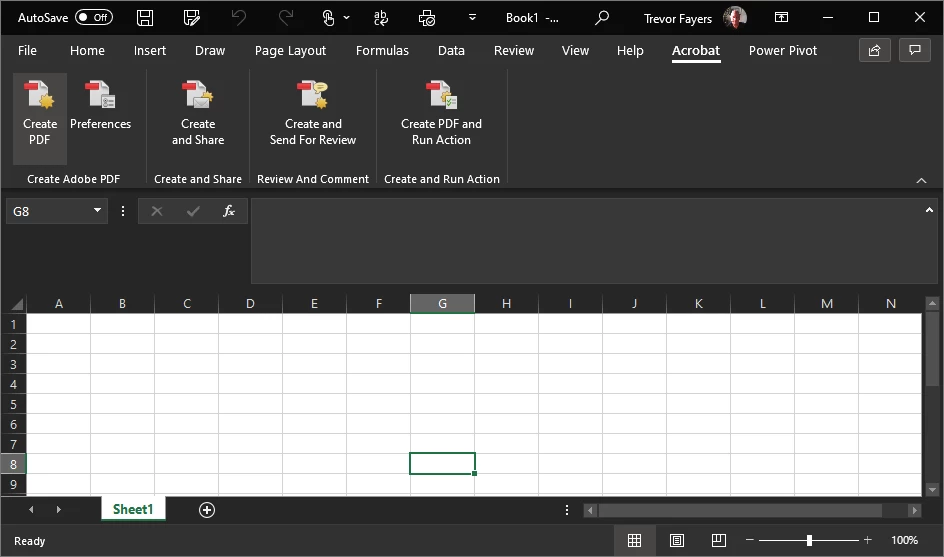
I can't find the setting that you are referring to, Bernd, but I've now found the menu for the Adobe Add-in in Excel. Clicking on the Creat PDF on the left hand side opens the file in Acrobat DC. Was it this you were referring to, or a setting somewhere else. If somewhere else, could you provide details of where to find it please?


2 replies

Derinda
Participant
December 16, 2021

I updated my Adobe programs, and files exported from InDesign did not open automatically in Acrobat Pro DC like they used to. I'm on a new iMac desktop, and I figured out what the problem was--a box wasn't checked on the export.

I went to File>Export>Adobe (Print). In the General tab, I clicked on "View PDF after Exporting. Issue fixed.

Bernd Alheit
Community Expert
Community Expert
February 10, 2021

In what app does you use save as PDF?

Trevor1674
Inspiring
February 10, 2021

Thanks Bernd. I predominently use Excel, but also other Office 365 programs also , at times.

Bernd Alheit
Community Expert
Community Expert
February 10, 2021

It is a setting of the Office apps.