

Susanne Louise
Participant
February 23, 2026
Question

Open Sans appears uneven in PDF but fine in Word

  • February 23, 2026
  • 1 reply
  • 66 views

Hi!

I have installed the font Open Sans on my computer. Everything appeared to be fine when I used Open Sans in Word, but after exporting to PDF the font appears uneven in PDF. When opening the PDF in a browser it looks fine, but when I open it through Acrobat it looks odd.

You can see an example here of how it looks:
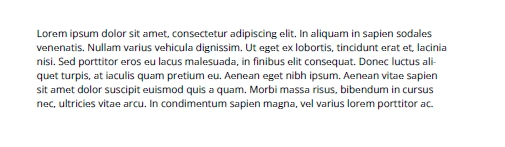
I have tried to delete and reinstall the font, I have tried variable and static version of the font. It simply does not seem to work.


Hope someone can help!

Thanks in advance!


Best regards,
Susanne

    1 reply

    Legend
    February 25, 2026

    Hi ​@Susanne Louise

    Thanks for reaching out, and sorry for the troubled experience. 

    This is likely happening because the font isn’t embedded in the resulting PDF. 

    Check this help document on how to embed fonts to the file: https://www.adobe.com/uk/acrobat/resources/embed-fonts-in-pdf.html


    You may also need to check if you are allowed to embed the fonts in your file. Some fonts provide limited rights for use. 


    Let us know how it works

    ~Tariq 

    Susanne Louise
    Participant
    February 25, 2026

    Hi Tariq


    Thanks for your reply! 
    I have already looked at the guide, but Open Sans already seems to be embedded:


    What does it mean to “allow” the font to be embedded? 


    Thanks again! :)


    Best regards,
    Susanne

    Legend
    February 25, 2026

    @Susanne Louise  - Thanks for the quick response.

    Could you share a couple of screenshots of the original Word document? And the PDF file you have created out of that Word document. 
    Let us know the following details as well: 

    • Acrobat version installed
    • Exact steps you have taken to convert the Word document to PDF
    • OS name and version