
hala1
Participant
April 8, 2021
Resuelto

Open type fonts gets listed as Type 1 font

  • April 8, 2021
  • 2 respuestas
  • 2589 visualizaciones

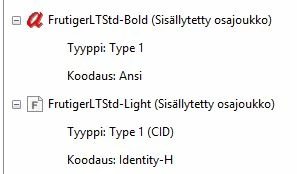
I have a question regarding fonts: I have created a PDF document with an open type font embedded in it. When I check the fonts in Acrobat, the font is listed as Type 1 font and shows the red a-symbol (see photo and pardon the text in Finnish). If I edit this document in Acrobat and add another open type font, that too gets listed as Type 1 font, but with different encoding and with an F-symbol.

Now what is going on here: why do these open type fonts show as Type 1 fonts. Does this mean that these fonts are included in the group of fonts that will not be supported after early 2023?
 

Este tema ha sido cerrado para respuestas.
Mejor respuesta de Dov Isaacs

Confirming @Test Screen Name's responses.


(1)  Yes, you will be able to continue editing text in Acrobat that is formatted with Type 1 fonts after the 2023 date, regardless of whether the host operating system discontinues any or full support for Type 1 fonts. Acrobat does have a private font directory.


(2)  Accessibility has nothing to do with the font type. The encoding vector embedded in the PDF file is key here.


2 respuestas

Legend
April 10, 2021

I'm not going to repeat any of Dov's excellent answer linked to, but I'm going to make another point: type 1 fonts in PDF are not going away. This is made clear in every Adobe announcement about type 1 font support. 

Meenakshi_Negi
Legend
April 10, 2021

Hello!


Thank you for reaching out and sorry for the delay n response.


As you are asking about why the open type fonts listed as type 1 font in Acrobat, please refer to the information provided by Dov in the following community thread with a similar discussion: https://community.adobe.com/t5/acrobat-sdk/why-do-opentype-fonts-appears-as-type-1-fonts-in-the-acrobat-font-list/m-p/8121785#M84733.

Check if the information provided there answers your question.


Hope this helps.


Thanks,

Meenakshi

hala1
hala1Autor
Participant
April 10, 2021

Thanks. Couple of things remain unclear to me. Adobe says that: "Type 1 data embedded in file types such as EPS and PDF will be unaffected by this change, as long as they are placed for display or printing as graphic elements. If those files are opened for editing in applications such as Illustrator or Photoshop, they will trigger a “Missing fonts” error."


1)What will happen in 2023 if I open a PDF file with type 1 fonts for editing in Acrobat Pro? Will I be able to edit the document without a problem? 

2) In 2023, will there be a problem with accessibility with said files and fonts? Will the screen reader programs be able to read the documents aloud without a problem?

Legend
April 10, 2021

"1)What will happen in 2023 if I open a PDF file with type 1 fonts for editing in Acrobat Pro? Will I be able to edit the document without a problem? " I doubt Adobe have really considered this. The Acrobat team don't tend to fall in with the rest of Creative Cloud.However... the question would be, even if Acrobat was willing to edit it, how would you install a type 1 font for editing purposes? The chances are (but we don't know) that Mac and Windows will also give up on the format as a font file format.


"2) In 2023, will there be a problem with accessibility with said files and fonts? Will the screen reader programs be able to read the documents aloud without a problem?" Not likely to be any connection. Reading out loud and extracting text do not reference embedded fonts, whatever kind they are.