Known Participant
May 8, 2020
Answered

Opening one PDF with a button on a second PDF in the same folder even after the folder is moved

  • May 8, 2020
  • 1 reply
  • 1388 views

I have several PDF's in the same Folder/Portfolio. I have   buttons on the main PDF that open other PDFs from the same folder. I have gone to the buttons's properties box, choosen the "action" tab, gone to the "select action" dropdown menu, chossen the "open file" selection and then when a window opens  selected the file I want the button to open.  This arrangement works fine until I move the folder to another location on my computer or I send it to someone else. 


I have tried without success to find a JavaScript or orher procedure that will not be thrown off by a change in the folder's location. 


Thank you for your time and hopelfully help.
This topic has been closed for replies.
Correct answer try67

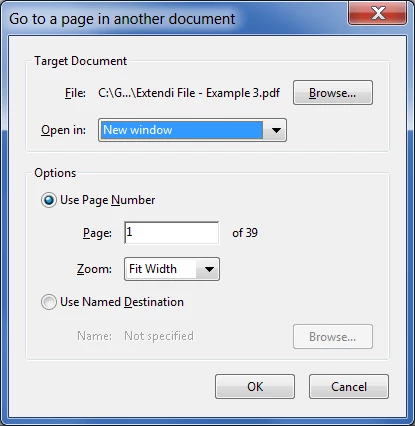
Yes, there is, but it's annoying to set up... After you create the link, right-click it with the Add Link tool, select Properties, then edit the Action and set it to open in a new window:


1 reply

try67
Community Expert
Community Expert
May 8, 2020

Instead of "Open a File" use the "Go to a page view" command and then open that file and link to its first page.

That link will be relative, which means that if you move the entire folder it should still work.

KYJudAuthor
Known Participant
May 9, 2020

Dear Try67,


You're fantastic. Who would have thunk it.

BUT I left out one fact/requirement.

It is fairly important to what I'm doing that the first PDF with the button remain open. When I use the go to page view action in the first PDF the second PDF opens as you said it would and the first PDF closes.

Is there a way to do this so that both stay open?

I'm sorry I didn't get back to you sooner. It's not a lack of interest but somehow the warning email didn't get to my brain.

thanks

try67
Community Expert
try67Community ExpertCorrect answer
Community Expert
May 9, 2020

Yes, there is, but it's annoying to set up... After you create the link, right-click it with the Add Link tool, select Properties, then edit the Action and set it to open in a new window: