Participant
June 26, 2025
Question

Opening pdf file from SharePoint Online has issue.

  • June 26, 2025
  • 2 replies
  • 561 views

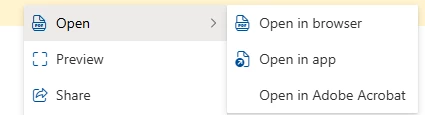
Adobe Acrobat for Microsoft 365 has been integrated in our Environment. When copy link from a pdf file on Sharepoint, and shared the link to user through email, when user click the link, a browser opens a black screen and said, "Something went wrong, please try again later" for a few seconds, then it open from the browser with no issue.  When user open the pdf file directly from the Sharepoint by select the ellipses, open | Open from Adobe Acrobat, there is no issue. How can I fix the issue of getting the error message? 



2 replies

Amal.
Legend
June 26, 2025

Hey there,

Hope you are doing well and thanks for reaching out and sharing the issue.


It looks like the PDF links shared through email are causing a short delay before opening properly in the browser. Since the file opens just fine when accessed directly from SharePoint or using the “Open from Adobe Acrobat” option, it’s likely not a file issue — more about how the link is being handled when clicked from an email.


This issue looks more like a loading glitch or redirection delay. If it keeps happening often, your IT team might also want to check if there are any network filters or proxy setups interfering with PDF previews.


Hope this information will help.


Participant
July 2, 2025

Hi Amal,


Thanks for your response. Could I please confirm the function of the Adobe Acrobat integration?


If a user only has an Adobe Reader license (and not an Adobe Acrobat license), are they still able to edit PDF files using this integration? Is the main purpose of this integration to enable users with an Adobe Acrobat license to edit PDFs directly in their browser?


Would this integration benefit users without an Adobe Acrobat license by allowing them to edit PDFs online?


From my testing, it seems that when a user opens a PDF file from SharePoint, the integration redirects the file to Adobe Cloud, where it is opened. In this case, is it using the company’s integration license or still relying on the individual user's license?


Kind Regards,

Terrence