


Participant
August 28, 2025
Answered

Option for combine file with Acrobat not showing if zip or rar file is in root folder

  • August 28, 2025
  • 2 replies
  • 576 views

Hi , 

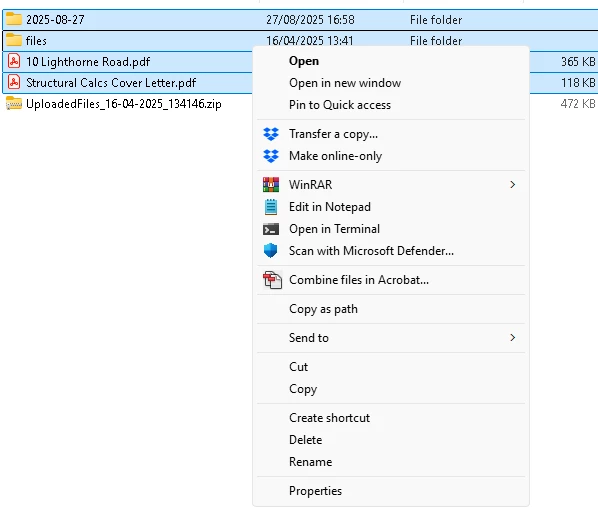
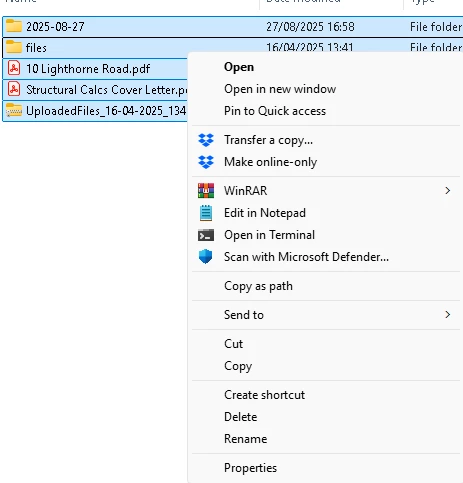
has anyone else noticed that the latest version of Acrobat Pro (27th Aug I think) has a bug ? If you select all the files in a folder, if there is a .zip or .rar file, the option on right click to combine isnt there. If you ignore the zip,it works fine. This has only occurred since this release
  

Correct answer PravalJain

That's very likely. I would argue it's a good thing, but changes to an established functionality can be confusing, that's for sure.


Apologies for the inconvience. This issue is fixed in the latest update. Release notes - https://www.adobe.com/devnet-docs/acrobatetk/tools/ReleaseNotesDC/continuous/dccontinuoussep2025sec.html#dccontinuousseptwentytwentyfivesec.


Please do a "Help -> Check for updates" to update to the latest version and let us know if you still see issues. 

2 replies

Participant
September 4, 2025

Unfortunately, Adobe Acrobat won't directly combine any ZIP or RAR files when using the "Combine Files" option because Acrobat will only utilize the file extension formats it can open (PDF, Word, Excel, image, etc.). If the ZIP file or RAR file is in the root folder, Acrobat ignores it. The workaround is easy. Just extract it first. After you extract the archive, you can then combine the PDF or image files into Acrobat. If you regularly work with archives, there are apps like Softaken Archive Converter Software, which extracts or converts ZIP and RAR files quickly on Windows.

wollopAuthor
Participant
September 4, 2025

Don't think you read the original post correctly

try67
Community Expert
Community Expert
August 28, 2025

That's because this file format can't be converted to a PDF... I would not consider that a bug.

wollopAuthor
Participant
August 28, 2025

It may not be a "bug" but its definately a change, as up to yesterday, it would ignore the selected .rar and .zip files and add the rest to to Adobe for combining. If there are .rar and .zip files in sub folders, these are ignored. Looks like its doing a different scan on the file types on the root folder than the sub folders

try67
Community Expert
Community Expert
August 28, 2025

That's very likely. I would argue it's a good thing, but changes to an established functionality can be confusing, that's for sure.