
Participant
April 11, 2018
Question

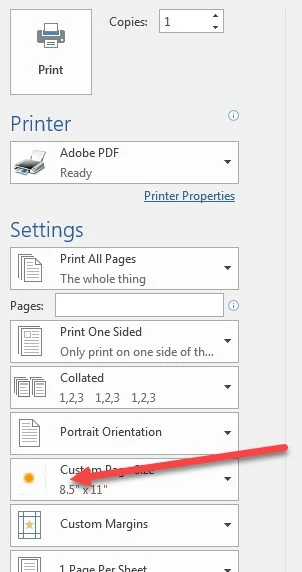
Orange dot by printer

  • April 11, 2018
  • 2 replies
  • 703 views

Once or twice a day when i choose to print a PDF the option 8 1/2 by 11 has an orange dot next to it and i cant print until i reboot the computer. it is a windows 7 64 with Adobe Acrobat XI. it works fine after rebooting until it happens again.
[Long title moved to body by moderator; title shortened for clarity]

This topic has been closed for replies.

2 replies

AnandSri
Legend
May 29, 2018

Hello Ricardoabad,

Sorry for the delayed response and inconvenience caused. As per the description above, you get an orange dot on Custom Page Size while printing any doc from Word or Excel to Adobe PDF printer, Is that correct?

Please check for any pending updates of Acrobat from help>check for updates, reboot the machine after installing the updates and see if this brings any difference.

Make sure that you have installed the latest updates of Office and operating system.

You can also repair Acrobat from help>repair installation, reboot the machine after repairing Acrobat and see if the orange dot disappears.

If the issue persists, remove/uninstall Adobe PDFPrinter, and install it back. To install Adobe PDFPrinter, please refer to the steps mentioned in the following Adobe article Adobe PDF printer is missing | Manually install PDF printer

If you still experience any issue, please share the following piece of information so that we can assist you in a better manner:

let us know how it goes and share your findings.

Regards,

Anand Sri.

Karl Heinz  Kremer
Community Expert
Community Expert
April 11, 2018

What application are you printing from? Can you print to the Adobe PDF printer from other applications when this happens?

Participant
April 11, 2018

Printing from excel or word this happens. once this happens i cant print to pdf until i reboot from any application