

RbbrBootz
Participating Frequently
December 29, 2019
Question

Organizing Tab Order of Form Fields

  • December 29, 2019
  • 2 replies
  • 2746 views

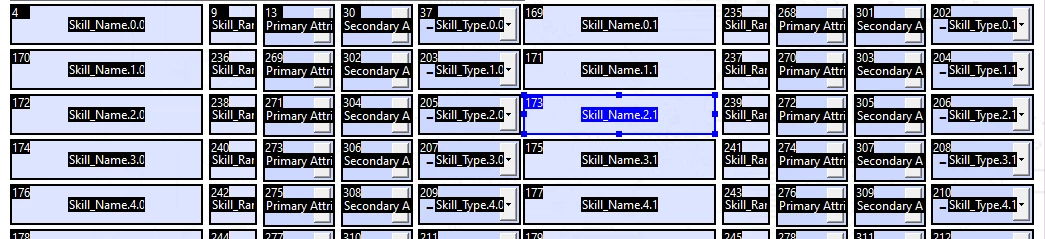
As per this post, I am trying to do the same, but have over 300 fields per page, and Acrobat does not organize them in any logical order.  I've used the create multiple copies function a few times, and it has decided to randomly organize them as per the attached pic.  I REALLY don't want to have to manually go through the list as it will only take one field at a time.  Is there a way to pull a section together easily and then grab it as a whole and move it into the order of the overall sheet?
2 replies

jane-e
Community Expert
Community Expert
December 29, 2019

“Acrobat does not organize them in any logical order.”


Hi

JR_Boulay’s reply will help you to fix what you have.


In addition, what I have seen in my experience with forms is that there is a logical order.


The first field created is #1, the second is #2, etc. Moving a field to a new position does not change its hierarchy, so that’s where setting Tab Order is essential. If you want to experiment with this, try having “Show Tab Numbers” on the next time you create a form and you’ll see how it works.


What I see in your image is that the five fields in the first row were created early, then each was copied eleven times (that we can see). Most likely, each was copied once, then the original and its copy were multiple-copied together. You can see that the first Skill Name is #4 and the others are #169–179, for instance, and the pattern repeats for the other fields.


So there’s the logic, but use Tab Order to fix it! 😊


~ Jane

RbbrBootz
RbbrBootzAuthor
Participating Frequently
December 30, 2019

I obviously didn't post a big enough picture.  See my reply to the main post.

JR Boulay
Community Expert
Community Expert
December 29, 2019
A picture is worth a thousand words.
😉
 
Acrobate du PDF, InDesigner et Photoshopographe
RbbrBootz
RbbrBootzAuthor
Participating Frequently
December 30, 2019

I obviously didn't post a big enough picture.  See my reply to the main post.