
Participant
January 30, 2019
Answered

Outlook Email does not open when using a link in a PDF Form

  • January 30, 2019
  • 1 reply
  • 7779 views

I have a button on a PDF form that used to open an E-mail and attach the PDF in the E-mail. It worked fine with Adobe Acrobat XI. Since upgrading to Acrobat Pro DC, this function no longer works. I get an error message that states "Adobe Acrobat DC does not allow connection to:" and then it displays the 2 E-mail addresses that should be included in the E-mail. Is this a bug that can be fixed?
This topic has been closed for replies.
Correct answer AkanchhaS8194121

Hi Kevin,

If we understand your query correctly, you are referring to a specific form which has a button enabled in it to send the form via email as attachment? Or you are referring to the send as an Email option available in the Acrobat's menu-bar at the top?

You may check the following-

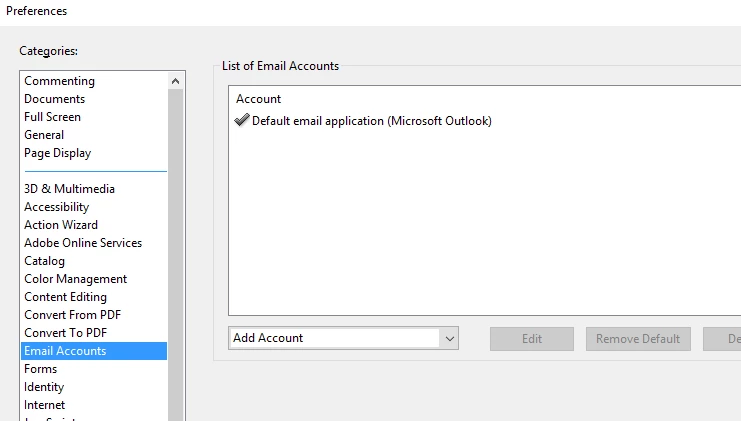
1- Make sure you have your email account set up as default within Acrobat's preferences settings.

Open Acrobat>Edit>Preferences>Email Account.

2- If it's there, then refer to the troubleshooting steps suggested here: Attach to email option is not working | Acrobat DC, Acrobat Reader DC

3- If everything else is working fine with the other pdf while attaching it to email. Then you may share this problematic file with us, we'll look into this.

"You can share the file with us via email. And you can send it to the email that is shared via private message. Please do mention your forum thread in the subject"

Regards,

Akanchha

1 reply

AkanchhaS8194121
AkanchhaS8194121Correct answer
Legend
February 5, 2019

Hi Kevin,

If we understand your query correctly, you are referring to a specific form which has a button enabled in it to send the form via email as attachment? Or you are referring to the send as an Email option available in the Acrobat's menu-bar at the top?

You may check the following-

1- Make sure you have your email account set up as default within Acrobat's preferences settings.

Open Acrobat>Edit>Preferences>Email Account.

2- If it's there, then refer to the troubleshooting steps suggested here: Attach to email option is not working | Acrobat DC, Acrobat Reader DC

3- If everything else is working fine with the other pdf while attaching it to email. Then you may share this problematic file with us, we'll look into this.

"You can share the file with us via email. And you can send it to the email that is shared via private message. Please do mention your forum thread in the subject"

Regards,

Akanchha

Participant
January 26, 2023