


damjans20119588
Participant
June 20, 2017
Answered

Overprint white - Simulate overprinting issue in Acrobat Pro DC doesn't show it

  • June 20, 2017
  • 4 replies
  • 2595 views

Hi,

by mistake I set overprint on a white rectangle in Illustrator.

My colleague inspected the PDF file (PDF X-4 which is converted from original AI file) after me but he didn't notice any error on the appearance of this white rectangle while selecting Simulate overprinting option in Output Preview window.

Usually overprinted white object should dissapear but in this case nothing happens. (on the picture bellow white rectangle is set as overprinted but it is still visible).
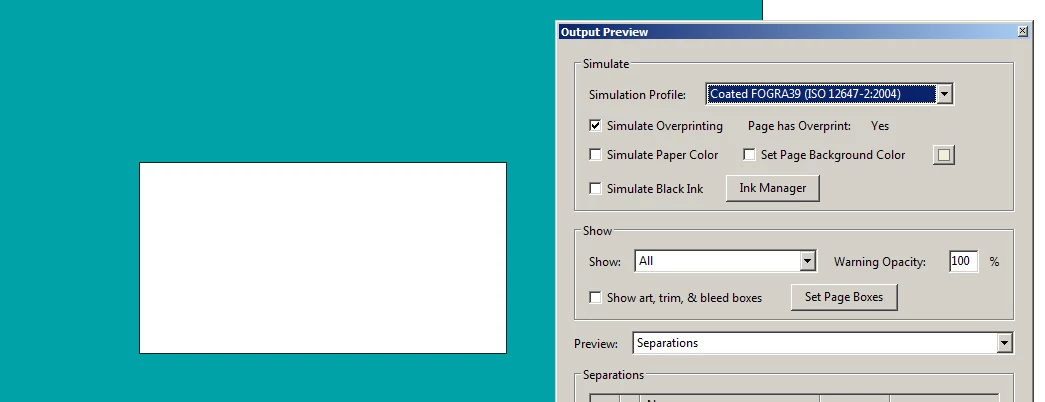
Maybe do you know this issue? What is the solution?

Many thanks.

Damjan Seruga

Correct answer Luke Jennings

I think this explains the problem:

Overprinting Process White

4 replies

Participant
October 28, 2025

Hi Everybody, I have the same problem with a file which was manipulated by ArtPro+ and the 0,0,0,0 white elements or Text was set wrong. After Artpro+ we get the white Object/Text is with OPM0 Overprinting Method. The Operator would like to check the file in Acrobat Pro, but the Output Preview doesn't show that the overprinted Objects are transparent. What is the visuell solution to check this user error in Acrobat Pro in 2025? 🙂 Many thanks for your help. 

Legend
June 20, 2017

So Illustrator might be fixing it before Acrobat sees it? could be. Bug? Or helpful feature?

Luke Jennings
Luke JenningsCorrect answer
Inspiring
June 21, 2017

I think this explains the problem:

Overprinting Process White

damjans20119588
Participant
June 21, 2017

Luke Jennings, thank you for the answer.

I find it very very useful.

However, do you maybe also know how to turn off this option by default?

I know it sounds a little strange but my final output file is actually AI file. PDF serves only for checking and therefore would be better if this mistake is noticeable in PDF.

Thanks again!

Damjan

Luke Jennings
Inspiring
June 20, 2017

I think you found a bug. A test file saved from Illustrator CS6, with a white box set to overprint, displayed as expected in Acrobat DC (it overprinted). The same file saved from Illustrator CC or above would not display correctly in Acrobat DC. Also, the white box was not overprinting when viewed with PitStop inspector. (The file saved from CS6 did show as overprinting in PitStop). It looks to me like Illustrator wants to go beyond just warning you about setting white to overprint and is forbidding it?

Legend
June 20, 2017

You are correct that, while it is pretty random whether white overprint disappears in general, the rules for correct PDF/X handling say it must be so.

So I have two possible ideas

1. Could the colour be "nearly white" (e.g. 0% 1% 0% 0%)?

2. Could colour management be converting the colours? For example if it were an RGB white. But also if the CMYK colours have to be converted. Is Coated FOGRA39 definitely the output intent in the PDF?