dylantay300833
Participant
November 21, 2017
Question

Override a calculated field in Acrobat DC form

  • November 21, 2017
  • 2 replies
  • 2902 views

Hello, I am working on the following cross-section of the below form and was wondering as to whether this would be possible, and if so, how this change would be accomplished. I would also like to note that I have virtually no JavaScript coding experience (I had to watch an online video to create the formula below), so simple, non-technical answers would be appreciated here

Here is my scenario:

Users can either enter their odometer readings in the "Odom. Start" and "Odom. End" columns to calculate the total # of miles automatically (a formula that I have manually coded to subtract the two fields), or hard-code their mileage in the "Miles" field, skipping the "Odom. Start" and "Odom. End" fields leaving them blank. I need to find a way for the user to be able to hard-code their mileage that will overwrite the formula in that field with the user's coded value. With the way this is set up right now, because the formula is calculating (Miles = "Odom. End" - "Odom. Start"), when the "Miles" field is hard-coded, the formula is still referencing "Odom. End" - "Odom. Start", reverting the miles to a value of 0 upon leaving the cell (since those two columns were skipped with no values inserted into them - the user directly entered information into the "Miles" column).
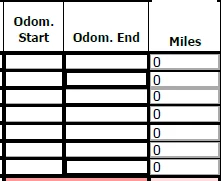
Is there a simple way that this can be done without familiarity of JavaScript? Any help here would be much appreciated. Thank you!

This topic has been closed for replies.

2 replies

dylantay300833
Participant
November 21, 2017

This worked perfectly! Thank you so much for your help. How would you add the validation that you mentioned into this form as well? Thanks!

Inspiring
November 22, 2017

Maybe something like this:

// Get a reference to the start and end odometer fields

var f1 = getField("ODOM_START_1");

var f2 = getField("ODOM_END_1");

// Only calculate this field's value if one of the input fields triggered this calculation script

if (event.source === f1 || event.source === f2) {

    // Only proceed if both input fields are not blank

    // and the numeric value of f2 is greater or equal to f1

    if (f1.valueAsString && f2.valueAsString && (+f2.value >= +f1.value)) {

        event.value = f2.value - f1.value;

    } else {

        event.value = "";

    }

}

Inspiring
November 21, 2017

If you want to do it that way, you will need to use JavaScript. A barebones custom calculation script for the first miles field could be:

// Get a reference to the start and end odometer fields

var f1 = getField("ODOM_START_1");

var f2 = getField("ODOM_END_1");

// Only calculate this field's value if one of the input fields triggered this calculation script

if (event.source === f1 || event.source === f2) {

    event.value = f2.value - f1.value;

}

You could add additional code so that the value is calculated only when both input fields are no blank and add some validation to ensure the end value is greater than the beginning value, etc. And since you have multiple rows, it would be better to create a function that could be reused for each of the miles fields. Post again if you'd like more help.