

PAdES B-LTA Advanced Signature Properties dialog shows Timestamp Authority as Not Available
Hopefully the ever helpful Steven Madwin can assist.
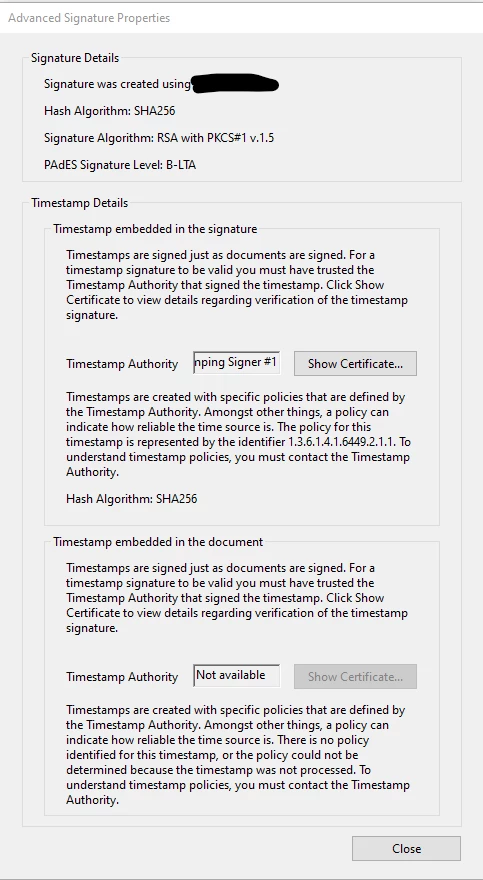
I've developed the PAdES signature logic for our PDF manipulation library. When we create a signature conforming to B-LTA by adding an ETSI.RFC3161 DocTimeStamp we get a "Timestamp embedded in the document" panel displaying in the Advanced Signature Properties dialog in DC 2019 (see below).
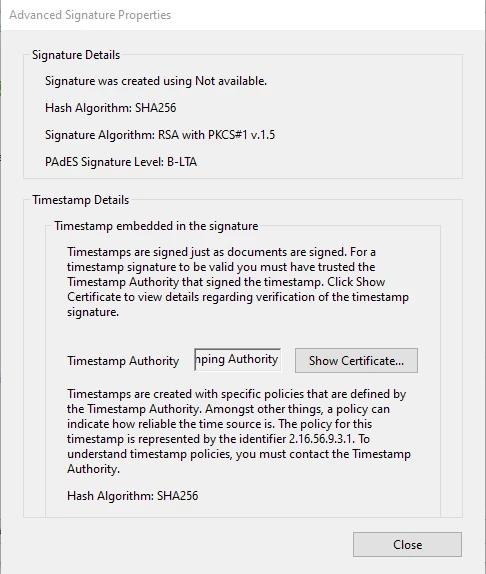
We are wondering why it appears, when we have seen other B-LTA signatures that do not have this panel (see further below). Also why does the Timestamp Authority show as "Not available". The actual signature is at Rev. 1 with the DocTimeStamp is at Rev. 2. The DocTimeStamp's CMS contains the certificate. My hunch that this is an embryonic step towards fully displaying the conforming attributes of B-LTA in one properties window? In which case does the second panel relate to the DocTimeStamp in Rev. 2?
For comparison here is a B-LTA signature from another file:
I have painstakingly followed the PAdES specifications during development. Is there something more we need to add to populate this certificate field? Perhaps DSS entries for the document timestamp certificate? Incidently, this does not affect the validity of the signature as shown by Acrobat.
Many thanks
Peter
P.S. This new Community forums design is a tad annoying. I used to be able to find things easily 😞
 AdChoices