Participant
September 24, 2021
Answered

Page dimensions not showing up in properties

  • September 24, 2021
  • 2 replies
  • 2477 views

In older versions of Acrobat you could hold your mouse over the bottom of a pdf and the page size would be come visible. Now, I understand that should be found under properties>advanced. But I don't see it. I'm on a mac running Big Sur and I'm using Acrobat Pro DC 2021.

This topic has been closed for replies.
Correct answer JR Boulay

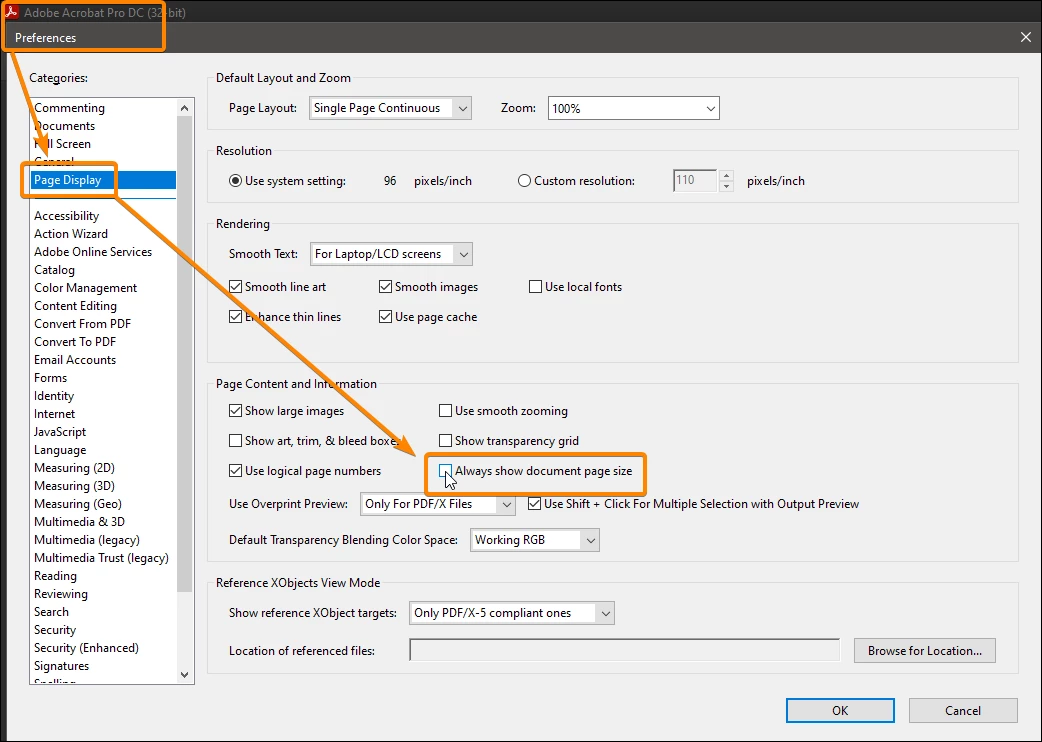
This setting is in the Preferences:


2 replies

Amal.
Community Manager
Community Manager
September 24, 2021

Hi there


Hope you are doing well and sorry for the trouble.


To check the page size of the PDF file please open the PDF > File > Properties > Under description tab, check the page size as shown in the screenshot below:


Regards

Amal

Participant
October 24, 2024

Serious?
Why don't I print, take a ruler and measure?...
Stop coming up with solutions like this. Fix the error!
We need this option!

JR Boulay
Community Expert
JR BoulayCommunity ExpertCorrect answer
Community Expert
September 24, 2021

This setting is in the Preferences:


Acrobate du PDF, InDesigner et Photoshopographe
Participant
September 24, 2021

Thank you JR!

Participant
September 14, 2023

not working anymore as last updat this is very bad i am very disapointed