
Inspiring
January 9, 2021
Question

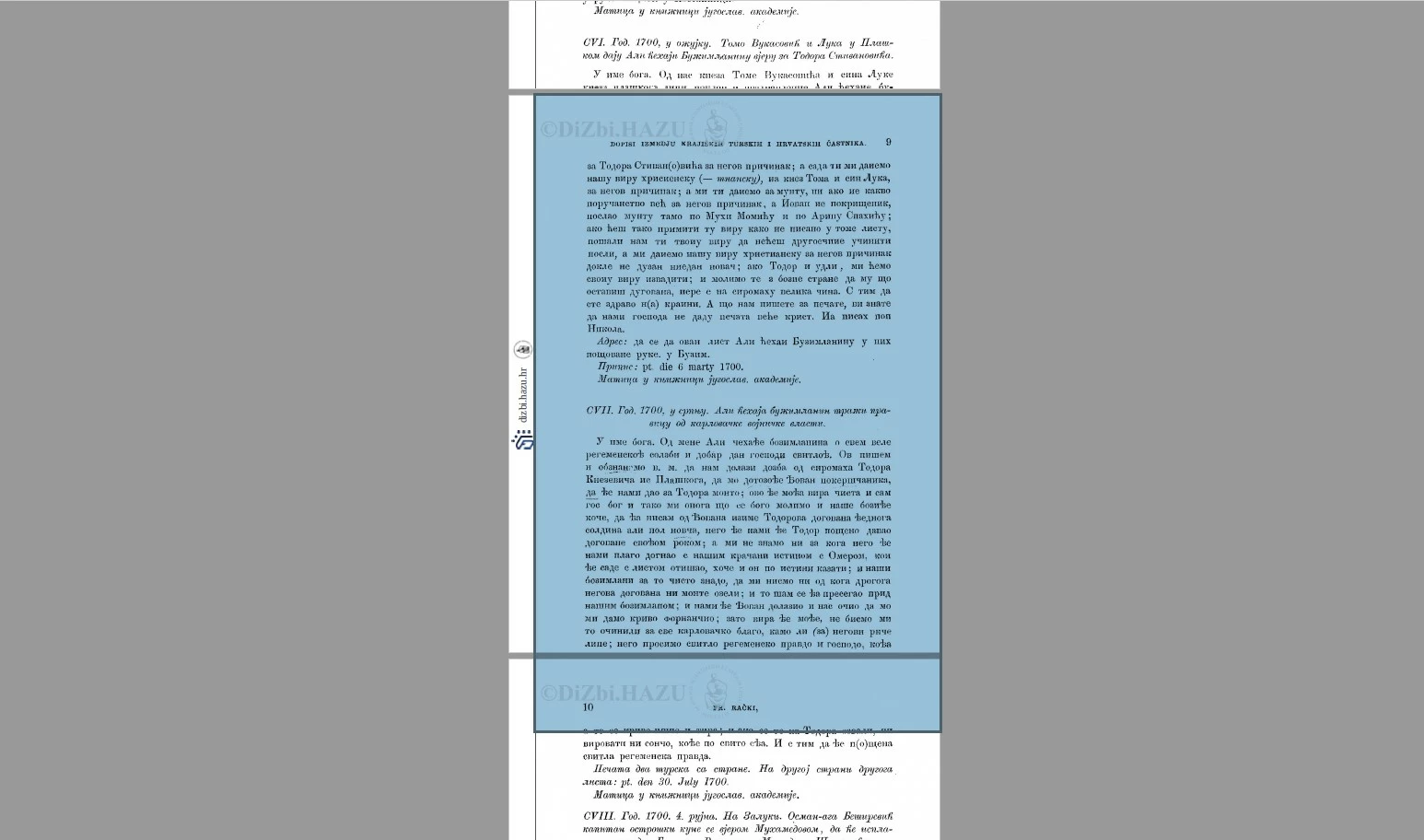
Page is larger than what is shown

  • January 9, 2021
  • 2 replies
  • 1191 views

So I downloaded a PDF of an old article that has on every page bottom cropped out. What is weird is that Adobe detects the whole page, and when I export a selection as PNG I get a full page.

I tried to go Export as PDF for the whole document, but it exports in the same view that this "damaged" PDF has.

Is there any way for me to export whole pages for the whole document (or edit PDF to see them without exporting as an image) without going page-by-page?


NB: This is not an Adobe problem, but a PDF problem for sure - I opened document in other PDF-viewing programs I have and there is the same problem in all of them.


This topic has been closed for replies.

2 replies

Luke Jennings3
Community Expert
Community Expert
January 10, 2021

In addition to the good information above, go to Tools> Print Production> Set page boxes, click the button Set to zero (applied to the crop box, all pages), If that doesn't work, go to Tools> Print Production> Preflight> Fixups (blue wrench icon)> Set CropBox to TrimBox (Fix), if that doesn't work, my last suggestion is to try and place the PDF into a new InDesign document, using the bounding box option when placing the PDF, then export to a new PDF.

Fico5C6CAuthor
Inspiring
January 10, 2021

Still doesn't work, but I think I found something that could help with troubleshooting. 

It seems like the author did not crop the whole page but actually cropped the image on-page. So no matter what margin I set I always get the same result because it is not a page that is cropped, but the image on the page.


When I go to "Remove crop" I can move images and see parts that are cropped out. Is there any way I can remove crop for all images in the whole document and resize the page to fit the new height of images correctly, or will I need to manually export all images?


Legend
January 10, 2021

I don't think Acrobat is able to change the cropping on an image (as opposed to cropping on a page). You are left with what the designer intended. It's sheer luck that you have the original uncropped images, often the cropped part is removed when the PDF is made.

Legend
January 9, 2021

Someone cropped the pages,  normal process that doesn't crop the contents. Acrobat can change the crop back. 

Fico5C6CAuthor
Inspiring
January 9, 2021

But how is my question? 

Legend
January 9, 2021

In Acrobat Pro DC, go to Edit, and Crop is one of the options in the toolbar.