
tonin57839323
Participant
April 28, 2017
Answered

Page numbers

  • April 28, 2017
  • 2 replies
  • 948 views

I have created a 200 page pdf document, but when adding page numbers (add header to existing)-- I lose the top of the pdf on about 25 pages. I did not create the pdf's of those pages.  The entire 200 pages came from the same source so I don't know why 25 pages would react differently to adding page numbers. Help!
This topic has been closed for replies.
Correct answer Dave__M

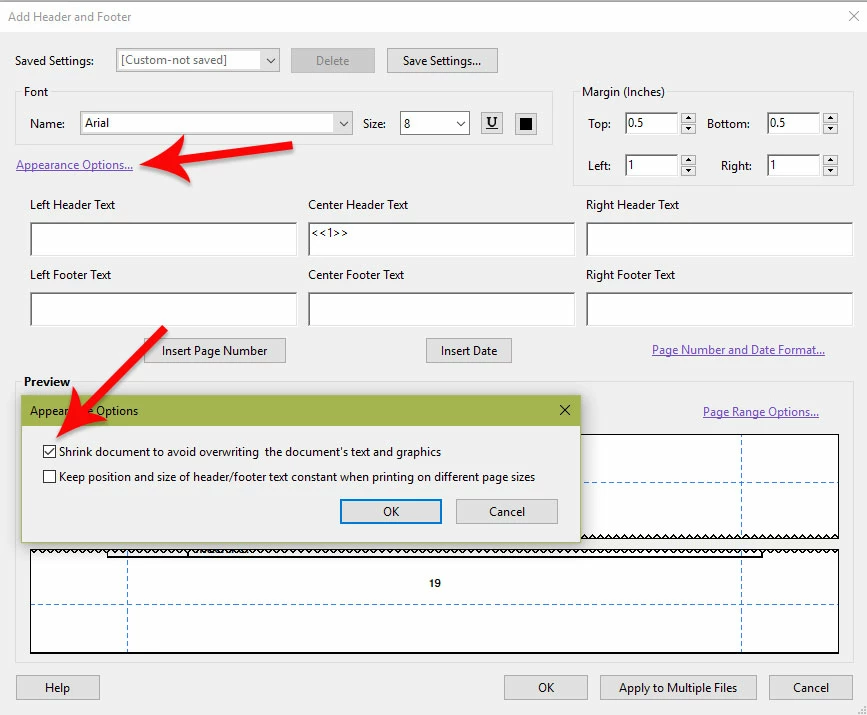
There is a setting buried in the Headers/Footers dialog box that might be of some help (if you have not yet tried it).  Click on the Appearance Options... link, and turn on the option to Shrink document to avoid overwriting the document's text and graphics.

I hope this helps.

My best,

Dave

2 replies

Dave__M
Community Expert
Dave__MCommunity ExpertCorrect answer
Community Expert
May 1, 2017

There is a setting buried in the Headers/Footers dialog box that might be of some help (if you have not yet tried it).  Click on the Appearance Options... link, and turn on the option to Shrink document to avoid overwriting the document's text and graphics.

I hope this helps.

My best,

Dave

Luke Jennings
Inspiring
May 1, 2017

The 25 pages that are not working as expected could have been added to the original PDF after it was created, and may have a different art, trim, crop or bleed box. In Acrobat, go to preferences> General> Page Display> Show Art, Trim & Bleed boxes. Do the 25 pages have the same boxes (and size) as the rest of the PDF? If not, you have a few options. You could place the 25 pages into a new InDesign document and export them to a new PDF, then insert the new 25 pages and delete the old (do not use replace pages, which will remember the incorrect box size). You could also use the place multipage PDF script in InDesign for all pages, adding auto page numbers in the master page. (You will probably still need to adjust the position of the 25 offending pages in InDesign), then export to a new PDF.