Participating Frequently
March 29, 2018
Question

Page Range Options; Header & Footer

  • March 29, 2018
  • 1 reply
  • 2695 views

Hey all,

I am currently having an issue with saved page range options on Adobe Acrobat.

I once created a template for the custom PDF's I make that follow as so:

Page 1: Cover Page

Page 2: Blank:

Page 3: Table of Contents

Page 4: Technical Information

Page 5: First Page of Information on Document.

Page n: Last page of Document

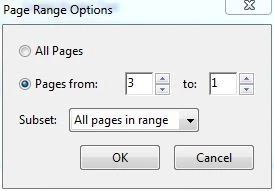
I set a custom setting to give me page range options before that looks like this:
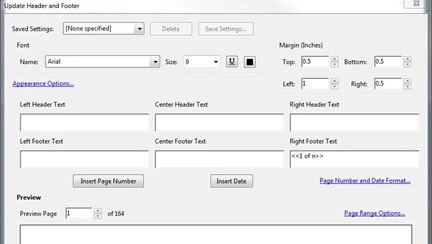
This created the ability for the pages to end on whatever the document ended on, which worked wonderfully!

Produced:  1 of n; n as the final page in the document.

However, with the newest updated version of Acrobat, it gives me an error and not allowing me to finish updating/replacing without changing to the correct range.

I commonly have to add pages and would like to just update headers without having to actually go in and edit the final page. Does anyone know a way of making this possible?

Thanks!

This topic has been closed for replies.

1 reply

Participant
April 3, 2018

Can we get a tech from Adobe or someone on this?

Thanks.

try67
Community Expert
Community Expert
April 3, 2018

This is a user-to-user forum, for the most part. Adobe tech are not likely to post here.

To be honest, I'm surprised it worked for you in the past as it doesn't look correct. You most likely enjoyed a bug in the application, which has now been solved.

Participant
April 3, 2018

Alright, I appreciate the information.  Are you possibly aware of any way to create a setting where the adobe header and footer saved setting can create a 3-n page numbers? I have attempted a lot of different approaches and not had any luck other than to change the page range each time.

As I am working in parts books, I complete anywhere from 1-5 a day and this would be a nice setting to make sure I do not miss any for one reason or another.

Thanks.