Participant
January 8, 2019
Answered

Page sizing & handling grayed out

  • January 8, 2019
  • 3 replies
  • 20524 views

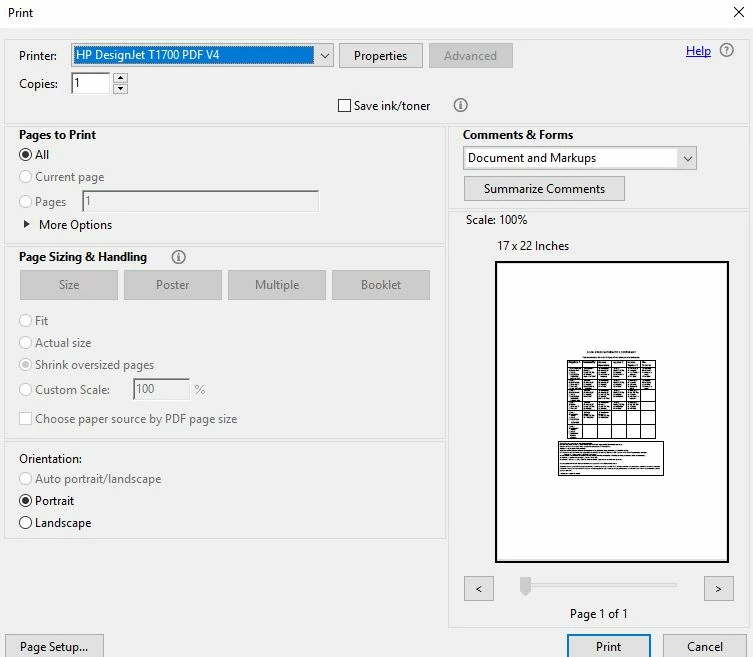
Page sizing and handling is grayed out when I select an hp designjet plotter to print to (see below). It is accessible when I select my normal 8.5x11 printer. Please help me fix this.

Correct answer Old_Janx

Thank you for the quick reply Jason,  Installing a driver without PDF worked perfectly! I can do everything required now.


Cheers.

3 replies

Participant
March 23, 2023

Only recently upgraded to CC and this is the first major problem. Same issue, Acrobat pro page size and handling greyed out, so we have no control over the document when attemting to print to a HP designjet Z9+. Tried printing the same PDFs via another PDF reader (not adobe) to the printer and it works fine, but were paying for full acrobat so would be cool if it worked.

Participant
March 23, 2023
Check your printer driver and make sure that it's not the version that has PDF listed in the name of the driver if it is change it to one of the drivers that does not have PDF listed in the name of the driver for the printer and it should resolve the issue

Sent from my Verizon, Samsung Galaxy smartphone
Get Outlook for Android<>
Old_JanxCorrect answer
Participant
March 24, 2023

Thank you for the quick reply Jason,  Installing a driver without PDF worked perfectly! I can do everything required now.


Cheers.

Participant
June 21, 2022

I am having this issue. Did anyone find a fix?

Please, I have scoured the internet and have not found a fix. Please Help.


Participant
February 21, 2023

I am still having this problem as well. Has anyone found a solution yet?

Participant
February 21, 2023

Here is what I found and what worked for me.

Download HP Designjet T2600 Drivers

https://support.hp.com/us-en/drivers/selfservice/hp-designjet-t2600-multifunction-printer-series/26285320

Driver-Driver Pack (1)

Click Download

      If not working, go down the list to Driver-Printer (4)

      HP DesignJet and PageWide XL PCL3 Driver for Windows (note: Not the PDF one).

      Click Download

Follow instructions

when asked to install standard or custom, choose custom

      Choose a T2600 driver that does not have PDF in the name.

AkanchhaS8194121
Legend
January 9, 2019

Hi Markm,

As shared via screenshot, it seems to be the printer specific issue. Where printer itself has its default settings. You may refer to the printer setting by going to the control panel.

  • Right click on printer (hp designjet plotter)> Properties>Properties>Change Properties
  • Check with any other application than Acrobat, and try printing using same printer.
  • If that doesn't fix the problem, please refer to the printer support.

Regards,

Akanchha

Participant
January 9, 2019

I followed the directions above and it still did not work. Powerpoint allows me to change paper sizes and scale to those sizes. Adobe Acrobat DC is still grayed out. Please advise.

AkanchhaS8194121
Legend
January 10, 2019

Is it possible to share this both ppt and .pdf  files with us? We would like to test the same at or end to check whether issue is reproducible or not.

You can upload the file on Document Cloud or any other storage and share the link here. Or you can send via email to the email address shared in private message. Share Adobe Creative Cloud files, libraries, prototypes, and more

Note: Please do mention your forum thread and name in the email subject.

Regards,

Akanchha