
productie2490212
Participant
June 19, 2017
Question

parsing problems opening a 3D PDF

  • June 19, 2017
  • 3 replies
  • 9579 views

Since last friday, I'm unable to open 3D PDF's generated in SolidWorks 2017 SP3.

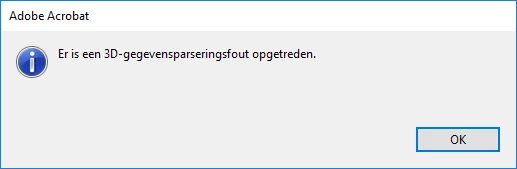
After I created a 3D PDF in SW, I tried opening it with Adobe Acrobat DC. Adobe return a parsing problem.
This was the first time I encoutered these problems. I tried to find a solution using the Solidworks forum, but no result.

I tried opening the 3D PDF on other computers (both Apple and PC) thet didn't have any problems with the files.

I don't know where else to look for a solution.
This topic has been closed for replies.

3 replies

Participant
November 18, 2022

Solution works perfectly for me! Thanks very much!

Adobe Employee
December 21, 2017

To investigate the bug furthur, could you please share

1. The version of the installed Acrobat/Reader with which you are seeing issue?

2. Please share the file that you created via SolidWorks 2017 SP3

3. Please share the OS that you are testing on - Windows or MAC and the versions too.

Inspiring
June 30, 2017

Hi,

I had this issue with my Adobe Acrobat Pro DC and Adobe Acrobat DC reader and the "solution" we found to fix it was this one:

Go in the Adobe cache folder:

C:\Users\[user]\AppData\Local\Adobe\Acrobat

Then rename the folders:

DC --> DC_old

and

2015 --> 2015_old

(you can delete those folders, they will be re-created, but I prefer the renaming ).

Then run your program, it should be OK.

Participant
October 24, 2017

Hi all,

The solution working good but regularly after each case below, we must delete entirely then folder named DC.

- Windows update

- Video driver update

- Adobe update

Good luck.

Inspiring
October 24, 2017

Hi there,

Yes, this is "simply" a bypass, Adobe is informed about this. We are still waiting for a fix...

But for me, it works "every time" I get this issue...