Participant
April 24, 2019
Answered

Pass/Fail based on value of another field
  • April 24, 2019
  • 1 reply
  • 1691 views

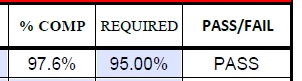
I am trying to get the PASS/FAIL field to say Pass if the % Comp is over 95% and Fail if is it less than 95%. Unfortunately, I'm not finding the right combination to get it to work when I change the value. The % Comp is a value that is calculated from other cells as well, I'm not sure if that is the problem or now.

This topic has been closed for replies.
Correct answer try67

OK, and I'm assuming the value of "Required" is the threshold, not a fixed value. In that case, use this code as the custom calculation script of "Field 1":

var v1 = Number(this.getField("Comp").valueAsString);

var v2 = Number(this.getField("Required").valueAsString);

event.value = (v1>v2) ? "PASS" : "FAIL";

1 reply

try67
Community Expert
Community Expert
April 24, 2019

Is the other field defined as a Percentage field (under Format)? What is the name of this field?

Should the threshold value be hard-coded as 95%, or is is the value of the "REQUIRED" field? If the latter, what is the name of that field, as well?

Participant
April 24, 2019

Yes they are both formated at percentage.

Right now % Comp is labeled at "Comp", Required = "Required", and Pass/Fail = "Field 1"

try67
Community Expert
try67Community ExpertCorrect answer
Community Expert
April 24, 2019

OK, and I'm assuming the value of "Required" is the threshold, not a fixed value. In that case, use this code as the custom calculation script of "Field 1":

var v1 = Number(this.getField("Comp").valueAsString);

var v2 = Number(this.getField("Required").valueAsString);

event.value = (v1>v2) ? "PASS" : "FAIL";