kenneth kam chuh21426993
Known Participant
October 4, 2023
Answered

Pass or Fail within value range.

  • October 4, 2023
  • 1 reply
  • 1449 views

I have two fields where I need to record the Time (hr) manually 

here, I have got 1.14 hr 

The time (min) field that automatically converts the hours to minutes. The script I used or the Time (min) field is 

var v1 = Number(this.getField("HR").valueAsString);

if(v1){event.value = v1*60;}
else
event.value ="";

As you can see, this gives me the correct answer 68.40. 

However, I have a third field to determine whether the result pass or fail. If the result is within the range of 61-75, then it should be a Pass. If it is outside this range, the result should be a Fail. 

However, as you can see above, 68.40 is within the Pass range but the result was shown as Fail. 

The script I use here is: 

var pf7 = Number(this.getField("HL").valueAsString);
if(pf7){
 if(pf7<=75 && pf7>=61)
 event.value = "Pass";
 else
 event.value = "Fail";}
else
event.value = "";

Any idea why the Pass or Fail doesn't work? 


Thanks


This topic has been closed for replies.
Correct answer Thom Parker

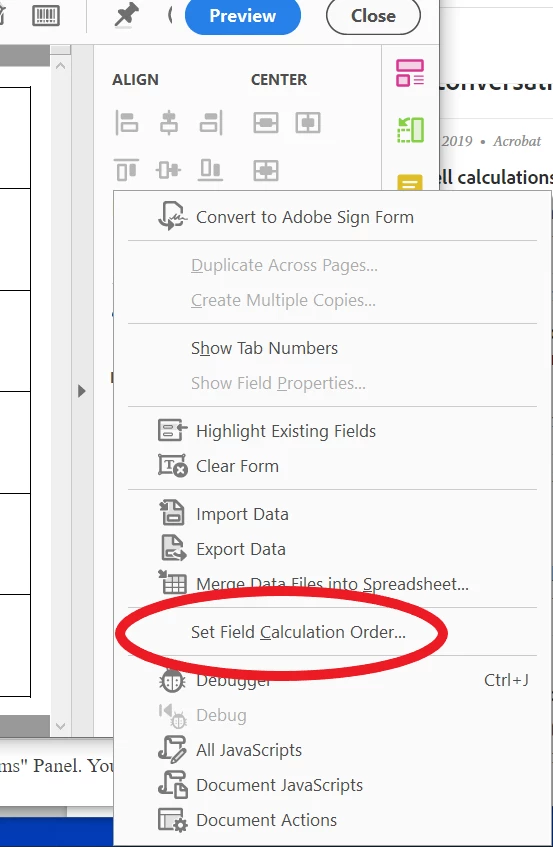
Try67 gave you the correct answer. It's the calculation order. 


1 reply

try67
Community Expert
Community Expert
October 4, 2023

The code seems fine. Check the fields calculation order.

If you still can't get it to work, share the file with us.

kenneth kam chuh21426993
Known Participant
October 4, 2023

Hi. Please find the attached file.

The highlighted row is the one you're after. If you change the numbers, lets say from 1.0 to 1.1, 1.2, 1.3, you would notice the answer (Pass/Fail) does not make sense. 

Thank you in advance for your help

Thom Parker
Community Expert
Thom ParkerCommunity ExpertCorrect answer
Community Expert
October 4, 2023

Try67 gave you the correct answer. It's the calculation order. 


Thom Parker - Software Developer at PDFScriptingUse the Acrobat JavaScript Reference early and often