Participating Frequently
April 8, 2026
Answered

Paste option is gone, what happened?

  • April 8, 2026
  • 2 replies
  • 313 views

What happened to the PASTE option.  I can copy and cut.  Paste is not a pick.  FIX THIS NOW!

    Correct answer Karl Heinz Kremer

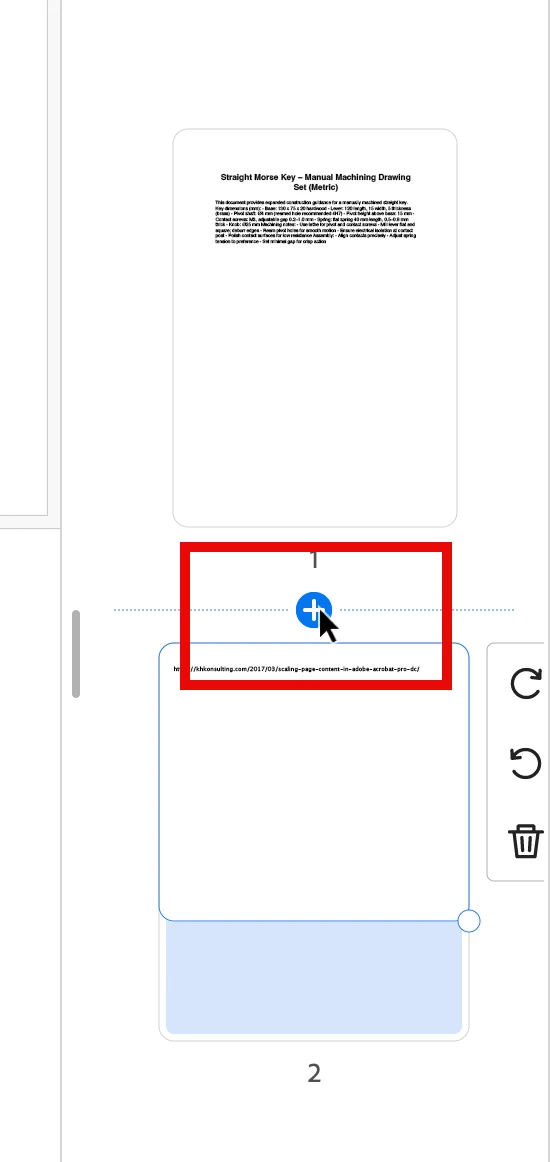
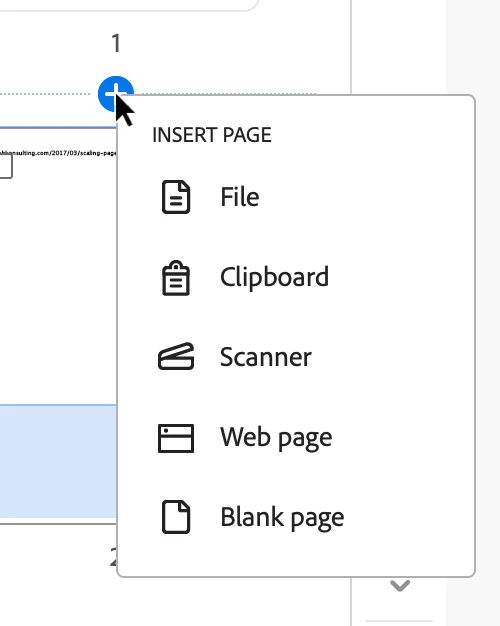
    @Camille26692163fj2t With the new interface, you click on the “+” that appears between the pages when you move your mouse, this will then ask you what you want to insert, and one option is “Clipboard”. When you select that, you should be able to “paste” your clipboard content:


    2 replies

    JR Boulay
    Community Expert
    Community Expert
    April 8, 2026

    Did you try to restart the computer?

    Acrobate du PDF, InDesigner et Photoshopographe
    Participating Frequently
    April 8, 2026

    Of course.  Even tried to repair the app.

    Dave Creamer of IDEAS
    Community Expert
    Community Expert
    April 8, 2026

    Version?

    Old or new interface?

    Any protection on the PDF?

    Can you use the keyboard command?

    David Creamer: Community Expert (ACI and ACE 1995-2023)
    Participating Frequently
    April 8, 2026

    New interface. No protection on pdf.  No, keyboard command doesn’t work either.  Prior to clicking Copy/Cut the Paste option is a pick.  After clicking on Copy, the Paste option disappears, only Cut or Copy.  I have been wasting so much time having to insert the file  with the page I want (yes, only want one page, but file has multiple pages I do not need) then deleting the pages I don’t need. 

    Karl Heinz  Kremer
    Community Expert
    Community Expert
    April 8, 2026

    What exactly are you trying to paste - and from where. Please describe your steps leading up to the missing paste option so that we can re-create this issue.