Inspiring
March 16, 2017
Question

PDF/A docs rejected by court

  • March 16, 2017
  • 3 replies
  • 2845 views

We are trying to move our office to Adobe Acrobat DC, but can't do that until we get this issue resolved.  Some courts require that documents be electronically filed in PDF/A format.  We have no problems filing PDF/A docs that are created using a program called pdfDocs.  However, all the documents created using Adobe Acrobat DC are rejected, and the error that the court gives us is:  Document is not a well-formed PDF document.

The PDFs are created in various ways - some converted from Word; some scanned; some Word conversions combined with scanned; etc.

Any ideas? 

This topic has been closed for replies.

3 replies

Legend
October 24, 2017

PDF/A-1a is much harder to make, it needs tagging which is labour intensive, but Acrobat Preflight can get you started. Good detective work.

wcbrian
Participating Frequently
October 24, 2017

Apologies if this is unneeded anymore, but this was the first/best thread I found on the subject.

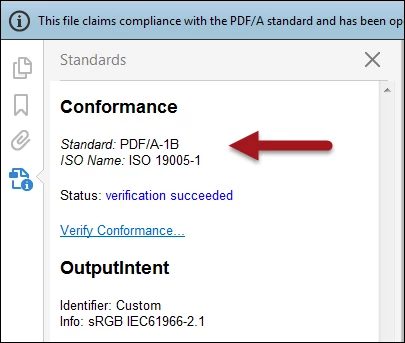
We've run into this as well, and the root cause is the myriad forms of PDF/A standard that exist. Acrobat DC, at least, defaults to PDF/A-1b, but most of the validators used by the courts expect/demand PDF/A-1a format... which PDF/A-1b will fail. They just suck at telling you that (other than saying they are not "well-formed"... which is useless information.)

I had to burrow deep into documents from the court to figure this out. (Example: http://www.nysd.uscourts.gov/ecf/ECF_ReleaseNotes_District_5.0.pdf )

Hopefully this info will help someone avoid the amount of hair loss this one gave me...

Dov Isaacs
Legend
March 16, 2017

Without knowing what the “court” is using to validate the PDF/A-1B files, it is impossible for us to know what the issue is.

Possibly, they are using an old version of Acrobat that had some “issues” with its PDF/A validation. Possibly, they are using some third party tool that isn't getting it right.

The Acrobat DC Preflight for PDF/A is perhaps the most robust and strict validators for PDF/A in the industry and previous issues like this have pointed to bugs in other validators.

So please, give us some more information and perhaps you can either post or in a private message to me on these forums point me to such a file such we can test it here at Adobe.

          - Dov

- Dov Isaacs, former Adobe Principal Scientist (April 30, 1990 - May 30, 2021)
Charles Kirby_783
Participant
June 9, 2017

How could Adobe not know what software the court is using? District Courts have been using ECF version 6.1 for a couple of years now. Maybe pdfbox.jar? Surely Adobe is in contact with such courts to be sure they're on the same page.

This is a perennial issue. I think everyone just gives up and rescans the document and uses "print to PDF." I would just stick with older versions of Adobe Acrobat until these problems have been ironed out.

Inspiring
June 9, 2017

Adobe products are used world wide and are probably used in courts world wide. That is a lot of legal jurisdictions. Also Adobe sells to other organisations world wide and does not keep track of what each user or user organisation requires.

Are you sure your issue is the PDF/A specification?

Some courts also require the PDF is created to a very specific version of the PDF standard.

You might try to find out what very specific issues the court is having with the documents you are providing them with.

Acrobat has hundreds of various settings that may or may not be important. Also specific courts may have different standards than other courts, for example, the U.S.  Supreme Court might have a different set of requirements than say the Cook County Courts of Illinois has.

See Adobe's AcroLaw blog by Rick Borstein and his posts on Creating PDFs.

Note that the U.S. Patent Office and their court system has special PDF requirements. This may also hold true for other administrative courts within the U.S.

Make sure your PDF standard for creating PDFs is targeted to Acrobat version 9 PDF Standard 1.8.