
PDF application not working properly in web browsers
Hi!
I am working on a PDF application with fillable forms. There's a payment information section on it's last page that looks like this: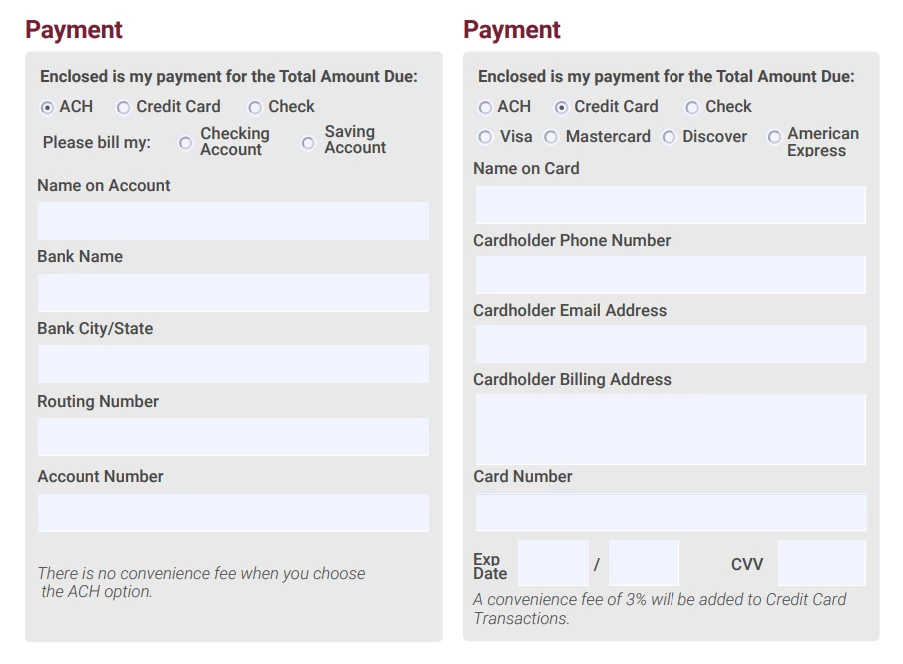
I wrote JS code on radio button 'mouse up' event so when the user chooses Credit Card option, the whole group of ACH fields are being hidden, and the Credit Card fields become visible. It works perfectly well when the application is opened in Adobe Acrobat, but when I open it in web browsers (I tried Chrome, Opera and Edge with the same result) something strange happens. It seems to me that the fields interfere because of laying on each other. Changing of display property works fine, but when I choose the Credit Card option, its fields are not editale unless I click somewhere on the screen to set the focus off any field. Then I can click on the field and it works. To use the next field, I need to click somewhere again, and so on. After I do that to the fields, they work well without setting focus off.
It's my main problem, and I created a test file illustrating it, it's attached below.
However, I've tried to get around the problem and simply move hidden fields to a 'safe' place where they wouldn't interfere with the visible ones by changing their 'rect' property. It also works fine in Acrobat, but it seems that in browsers access to a single radio button of a group using code
this.getField("Group1.0") also doesn't work (in fact, it returns 'undefined').
I can't think of what else to do to make the app work in browser properly. Help me please!
P. S.: it also seems pretty strange to me that I wasn't able to find any similar issues in the Community. But maybe I missed something 🙂
 AdChoices