
January 19, 2026
Question

PDF Conversions are skipping many charcters

  • January 19, 2026
  • 2 replies
  • 58 views

I submitted 4 PDF filings in court on Friday which were converted from Word to PDF using Adobe.  We have the full paid subscription version of Adobe.


When we converted and submitted 4 court filings, on second look, we saw a huge number of conversion problems, such as this:
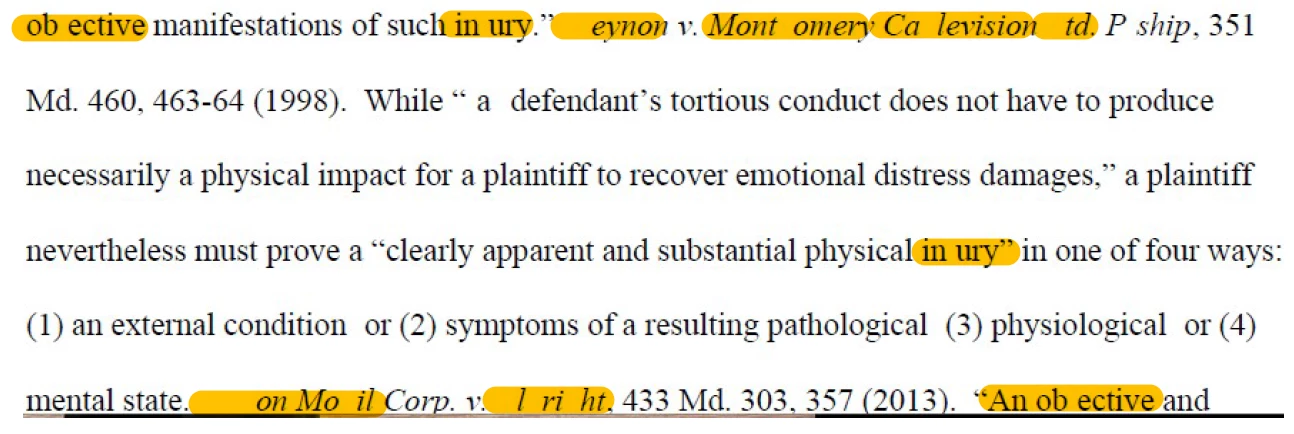


I recently received PDFs from others (not in my firm) of filings they submitted and noticed certain characters skipped in their PDF files too! 


Between all PDFs with comments restricted, my client not being able to print PDFs I send to them, and now this, I can no longer trust the Adobe product and am forced to use Nuance instead, which is much more stable and reliable.  Adobe, please respond to and investigate these issues.


Beth

2 replies

January 19, 2026

PC.  After looking at this issue more closely, I am going to RESCIND this post.  PDF conversions on my end were correct (no missed characters), however the submissions loaded to the court's efiling system and distributed to the court/parties were problematic.  This may be a CM/ECF issue.

gary_sc
Community Expert
Community Expert
January 19, 2026

Thanks for the update. Are you allowed to do the conversion on your end and just upload the results? If this affected you, I cannot begin to believe that you're the only one. There have to be others.

gary_sc
Community Expert
Community Expert
January 19, 2026

Wow, that's strange. A couple of questions: Mac or PC. I'm a Mac guy; if PC, someone else will help you.


That appears to be Times font. Am I correct? If not, what is it? Can you verify that the missing letters are the same font as the rest? (I noticed that "j" is particularly being hit.)


Also, please verify which version of Acrobat you are using, both the version number and whether it's Standard or Pro.


Lastly, can you please break down exactly how you convert from Word to PDF?