
Participating Frequently
April 28, 2022
Question

PDF doc with eSign and protected is after sending over email again not protected

  • April 28, 2022
  • 3 replies
  • 2531 views

Dears,


i am new to this, but i have successfully created and signed PDF document in macOS and Adobe Acrobat PRO. I have even added my digital eSignature (based on official paid certificate).


However i have some real issues with it:

- first, when i view the PDF document throught ADOBE Acrobat PRO, it shows that its "signed and all signatures are valid." But when opened via standard macOS preview app, then there is no information about signature and i can even delete the signature object

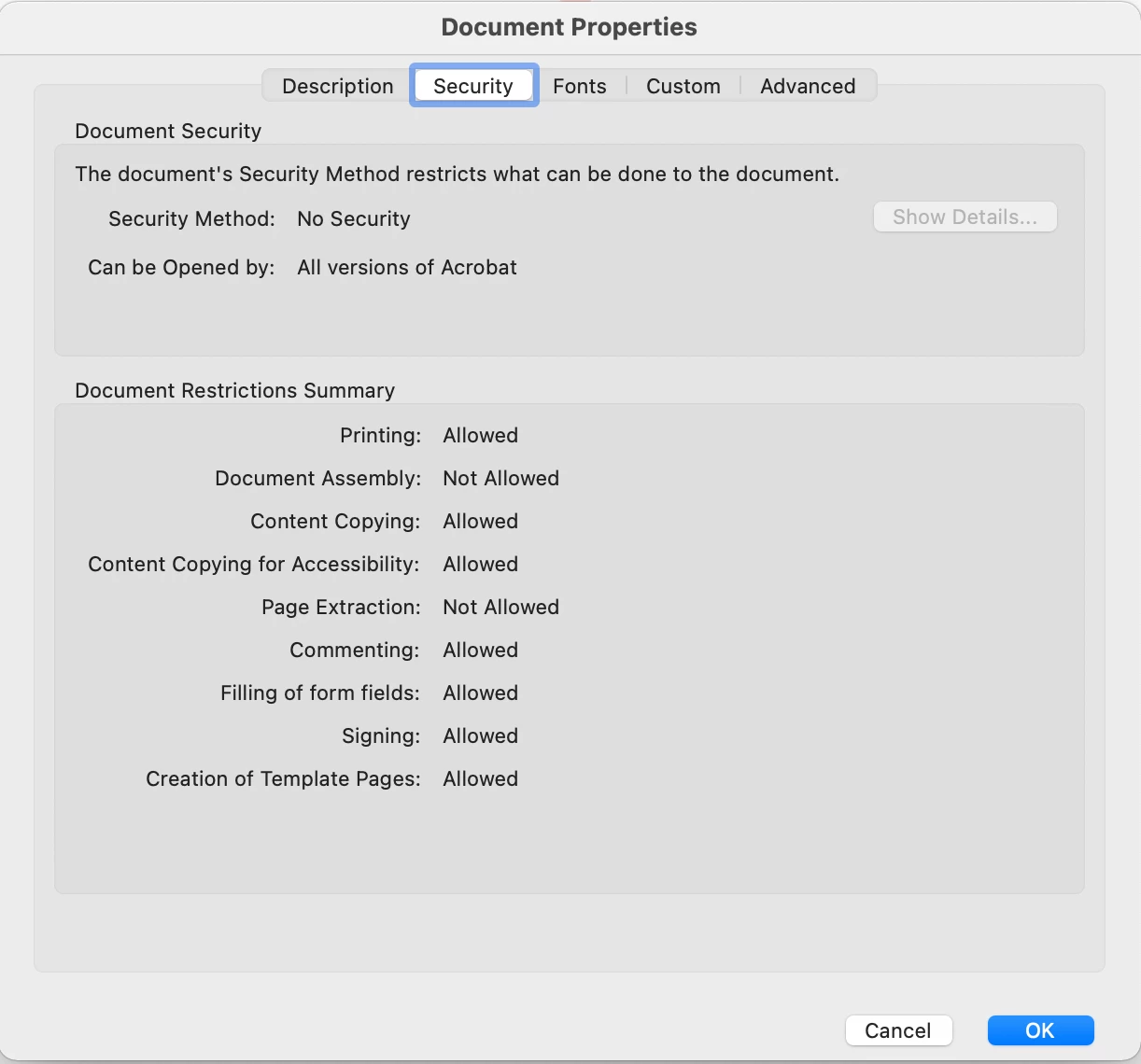
- second, when i sent the PDF (signed and protected) over an email to my self again and open it up, the protection is removed and signature shows just as picture object without saying its esignature.


Any ideas?


here is PDF security preference before
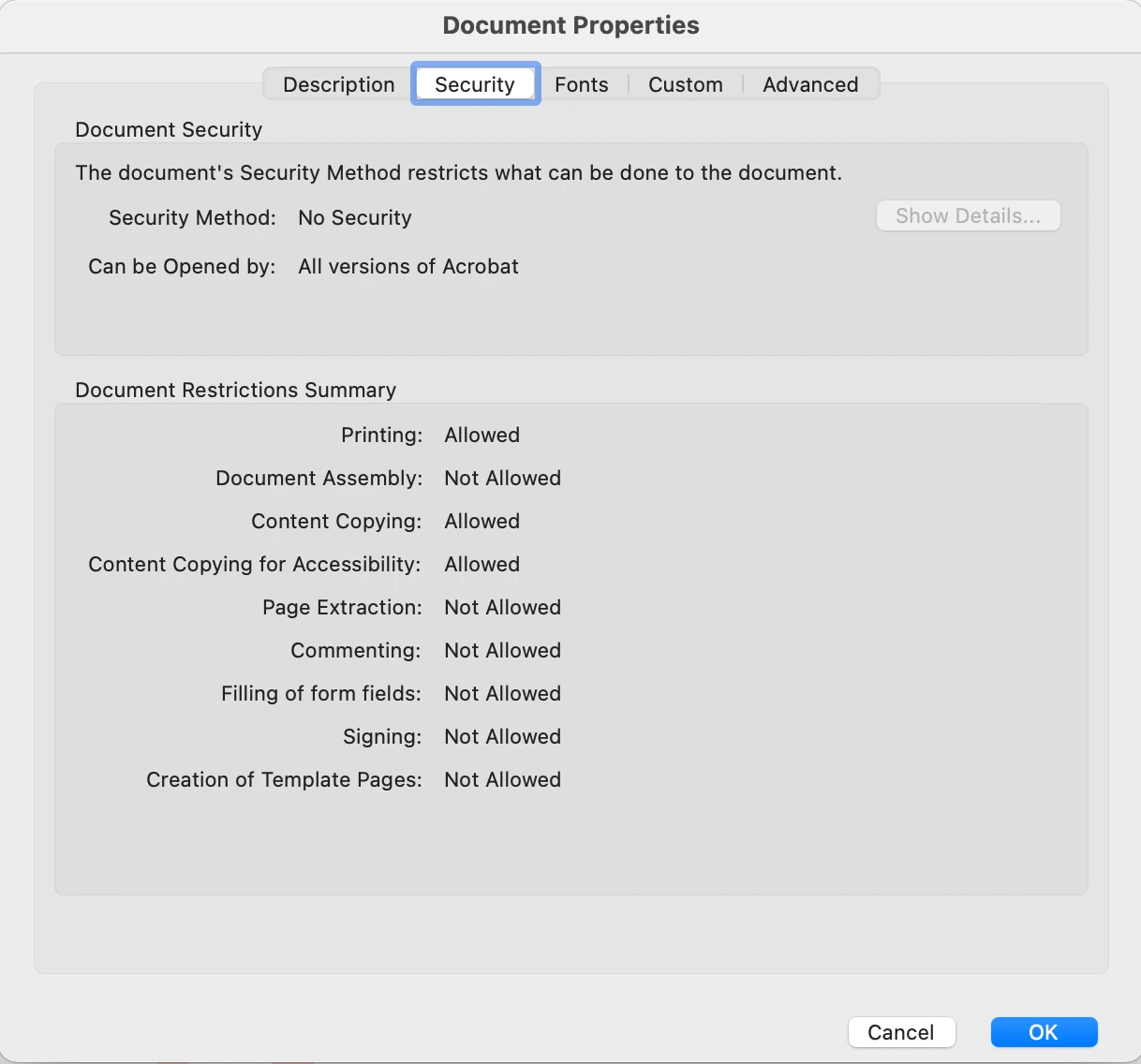


and here is picture of PDF security preference after sending it over an email to myself again


Also  i ticked the checkbox that i want to lock the document during eSigning. But i tried even to protect the PDF against changes after eSigning, but Adobe wont let it happen because the document is eSigned..


Any idea?


I followed the solution guides how to setup the certificates but i can not make it secure. I have even downloaded the Adobe Acrobat PRO (paid one), no luck


Kind Regards,

Martin

This topic has been closed for replies.

3 replies

JR Boulay
Community Expert
Community Expert
April 29, 2022

Preview (aka. "the PDF killer") is a dangerous software because it allows you to modify a signed PDF without any prior warning, which invalidates the signature.

In France, some legal documents are delivered as signed PDFs. Some people have modified them voluntarily or not with Preview and therefore their documents are worthless (some cost more than 350€).


Preview only supports the PDF 1.4 format, released in 1999, but not completely.

Acrobate du PDF, InDesigner et Photoshopographe
MikelKlink
Participating Frequently
April 28, 2022
quote

- second, when i sent the PDF (signed and protected) over an email to my self again and open it up, the protection is removed and signature shows just as picture object without saying its esignature.


Can you share a copy of the document both before sending and after retrieving?

Your description sounds like during transmission the signature form field had been flattened (and so all functionality except the appearance the was gone).


quote

- first, when i view the PDF document throught ADOBE Acrobat PRO, it shows that its "signed and all signatures are valid." But when opened via standard macOS preview app, then there is no information about signature and i can even delete the signature object


Please don't see the signature as a means to prevent changes. It is not. It is a means to detect changes.


Participating Frequently
April 28, 2022

Dear Mike,


i think i solved the first point, but in your answer you mean that Apple`s preview app can rewrite (change) the PDF? I thought that PDF is secured against changes...


I sent you PM with link


Thank you


BR,

Martin

MikelKlink
Participating Frequently
April 28, 2022
quote

i think i solved the first point,

Just after answering I saw your message that you had solved your first issue. I merely was too lazy then to edit my answer. 😉

quote

in your answer you mean that Apple`s preview app can rewrite (change) the PDF? I thought that PDF is secured against changes...

A PDF signature does not prevent changes to be applied to a document. It merely allows to detect them.


A PDF signature contains the information which byte ranges of the PDF file are signed and (implicitly or explicitly) a hash value of the bytes in those byte ranges. (Commonly only byte ranges are accepted covering the whole PDF revision created by the signer except the signature value itself.) These information are cryptographically secured using the private key of the signer which can be checked using the associated public key.


Nothing in this structure prevents a program to change the PDF.

But a recipient expecting the signed PDF can test

  • whether the expected signature is there; otherwise, someone has removed it;
  • whether the signature is from the expected signer by inspecting the cryptographic properties of the signature; otherwise someone manipulated the document and replaced the signature;
  • whether the hash value in the signature matches the actual hash value of the signed byte ranges; otherwise someone has manipulated the signed byte ranges;
  • whether the signed byte ranges cover the whole signed revision except the signature value; otherwise someone might have manipulated unsigned parts;
  • whether there are no additions added after the signed revision with newer revisions; otherwise someone has added content.

(Depending on the kind of signatures applied, specific added content in newer revisions may be considered allowed; this is used for e.g. for forms to allow fill-ins and additional signatures after the first signature.)


Adobe Acrobat executes these checks on signed PDFs. Many previewers don't. On the other hand there are web services for checking PDF signatures, e.g. the European Commission DSS Demonstration WebApp .

Participating Frequently
April 28, 2022

Update:


Uff, it solved it self regarding that the signature is not visible after sending it over an email.


However the point about macOS "preview" app is still valid. It displays/show the PDF but no sign that the PDF is eSigned and you can delete the picture object of signature.. 😕😕