



Mpierre
Participant
March 12, 2026
Question

PDF file displays blank pages when opened on Mac desktop and web app.

  • March 12, 2026
  • 2 replies
  • 39 views

When I open a PDF with Acrobat desktop or web app, almost all pages appear blank or background colors don’t render properly. I’ve ensured I have the latest Acrobat version, checked for updates, disabled online storage options, and even re-installed the app. None of these steps resolved the issue. However, I can view the PDF pages clearly in Preview on my MacBook Pro.
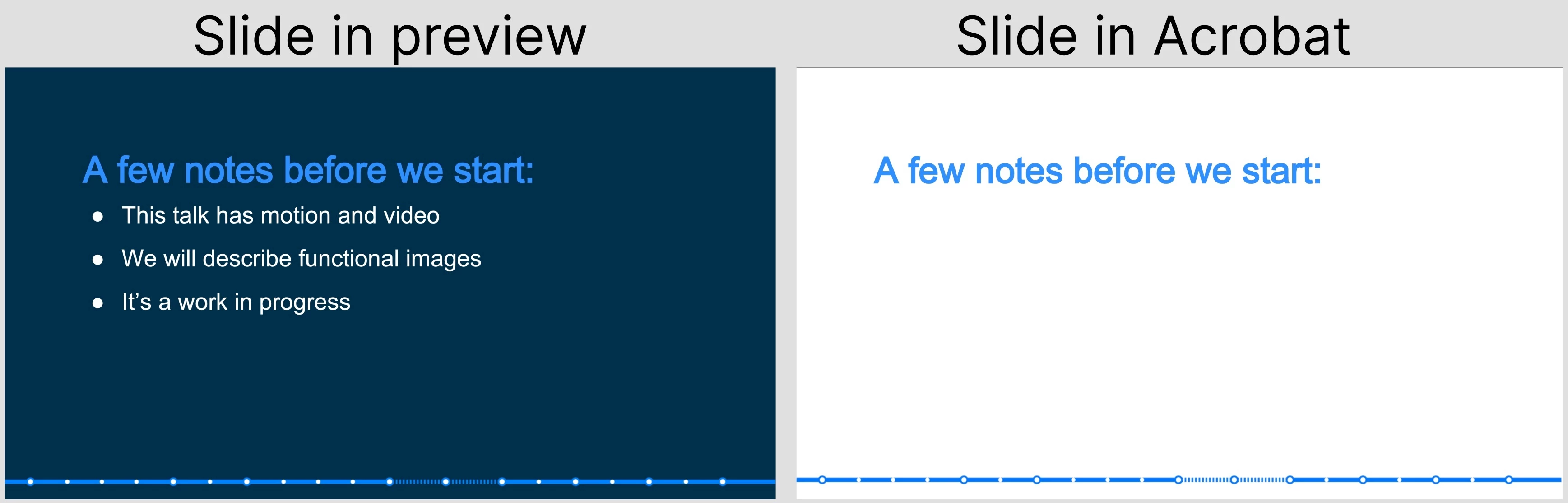
Thank you to anyone with a suggestion or solution.

    2 replies

    Dave Creamer of IDEAS
    Community Expert
    Community Expert
    March 12, 2026

    Check to see if this preference is on:


    David Creamer: Community Expert (ACI and ACE 1995-2023)
    Legend
    March 12, 2026

    Hi ​@Mpierre


    Thanks for reaching out, and sorry for the trouble. 


    When you open PDFs in third-party applications like this, the problem likely relates to how the document was created and which application was used to open it. 

    If you have access to Adobe Acrobat, you can try to check the file for fonts, layers, and other issues using the Preflight tool in Acrobat. You may find this help document for more information on how to correct problems with a PDF using the Preflight tool: https://helpx.adobe.com/acrobat/using/correcting-problem-areas-preflight-tool.html 

    If you want us to review the document, please share the file. And let us know how it works. 


    ~Tariq


    Luke Jennings3
    Community Expert
    Community Expert
    March 12, 2026

    Set your Acrobat or Reader page display preference to use overprint preview (Always).
    Can you upload a sample page of the pdf?
    I suspect the white type is somehow “grouped” with the blue background and needs to be fixed. As a test, try changing the white type to another color (in the source document) and export to a new pdf. Does that help?