PDF file type association broken after upgrading from Reader 2017 to Reader 2020 on Windows 10
The file type association for .pdf stops working after upgrading from Adobe Reader 2017 (Classic Track) to Reader 2020 (Classic Track). Issue occurs if file association is configured by DISM or user. Looking for solution appropriate for an enterprise environment.
Double-clicking a PDF file displays Windows prompt "How do you want to open this file?". The HKCR registry key still contains an entry for the ProgID, AcroExch.Document.2017. Is the Reader 2020 installer expected to remove the HKCR\AcroExch.Document.2017 registry key?
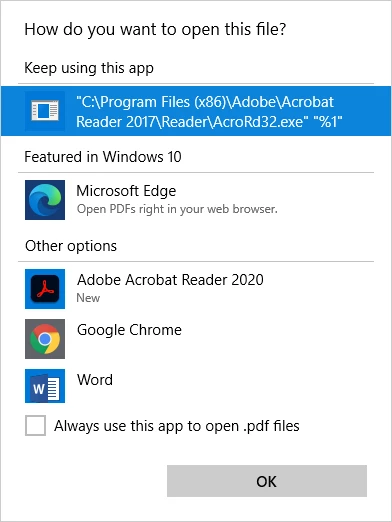
This does not occur on computers which installed Adobe Reader 2015 (Classic Track) and were subsequently upgraded to Reader 2017 and Reader 2020. They are configured with ProgID, AcroExch.Document.2015. The Reader 2017 installer removed the HKCR\AcroExch.Document.2015 registry key.
<Association Identifier=".pdf" ProgID="AcroExch.Document.2015" ApplicationName="Adobe Acrobat Reader DC" />
Steps to reproduce:
1. Install Windows 10 Enterprise.
2. Install Adobe Reader 2017 (Classic Track) using bootstrapper installation (setup.exe).
3. Set default PDF program. This can also be applied using DISM during operating system deployment.
<Association Identifier=".pdf" ProgId="AcroExch.Document.2017" ApplicationName="Adobe Acrobat Reader 2017" />
4. Install Adobe Reader 2020 (Classic Track) using bootstrapper installation (setup.exe).
 AdChoices