
Participating Frequently
Nov 10, 2026 1:34 PM UTC
Question

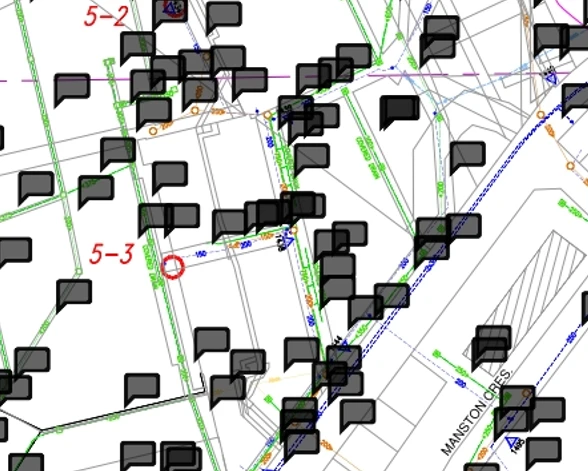
PDF from AutoCAD, displaying "flags" or black dialogue balloons on a phone, appears to be on text entities.

Multiple PDF files generated from AutoCAD.  Merged them into a single PDF using Acrobat Pro.  Compressed the file size. All appears fine on my computer.  Load it into a phone and I see hundreds of small black dialogue balloons or flags. Sample below.  How can I get rid of these permanently?
 

    21 replies

    Participating Frequently
    Nov 19, 2026 2:54 PM UTC

    Thank you.  I will ask my IT department to install the update.

    Just a bit more detail on how this file is generated.

    I use Civil 3D AutoCAD version 2024.  I have the default PDF plot option set, from Autodesk.  I plot 64 individual PDF files from Autocad.  I don’t see any options to control the comments in the PDF output.

    I then merge the 64 PDF files into a single PDF using Acrobat Pro.

    I then compress the document to reduce it’s file size.

    I then followed a previous suggestion to delete all of the comments (which I don’t need or want anyway) and saved to a new file.

    Everything looks great on my PC but when one of the guys from another department, uploads the PDF onto his android phone, he sees the text balloons.  He is using whatever default viewer is on his phone, author unknown by me.


    I hope this helps the development team.

    Cheers,

    Glen

    Translate
    Amal Jaiswal
    Community Manager
    Community Manager
    Nov 19, 2026 3:13 PM UTC

    ​Hi @TentMonster 

    Hope you’re doing well, and thank you for sharing the workflow with us.

    As mentioned by @PriyankaVishwakarma  in her previous response, we were unable to reproduce the issue using Adobe’s official Acrobat Reader mobile application on either Android or iOS.

    Based on our findings, the issue appears to be specific to the application currently being used to open and view the PDF file.

    Could you please ask the user to try opening the PDF using the official Adobe Acrobat Reader mobile application, available on both the Google Play Store and the Apple App Store, and check whether the issue persists?

    Please let us know the outcome so we can review further if needed.

    Regards

    Amal

    Translate
    Participating Frequently
    Nov 20, 2026 1:37 PM UTC

    I have the latest release installed now.  I generated a new set of PDF files from AutoCAD and then joined them together into a single document.  Then reduced the file size.  I went to delete all the comments and it is not allowing me to do that.  Each comment seems to have a small Lock character .

    And the Delete option is greyed out.

    What can I do to delete these comments, to see if this new version helps solve my original issue?

    Glen

    Translate
    Participating Frequently
    Nov 19, 2026 1:51 PM UTC

    Well, I removed all the comments from the PDF file and then had my co-worked upload and test the file on his Android again.  The “flags or Balloons” still remain.  See clip below and attached updated PDF file.

    Any further suggestions?

    Thank you,

    Glen

    Translate
    PriyankaVishwakarma
    Community Manager
    Community Manager
    Nov 19, 2026 2:23 PM UTC

    Hello@TentMonster,


    Hope you are doing well! Thank you for sharing the screenshot and the PDF file.
    I tested the shared PDF file on both Android and iOS devices using the Adobe Acrobat Reader mobile application, and the file appears to display correctly on both platforms, without the black comment marks shown in your screenshot.


    I also noticed that the application interface in your screenshot looks a little different from the official Adobe Acrobat Reader mobile application. It seems that the PDF might be opening in a third-party application.


    Could you please try opening the PDF file using the official Adobe Acrobat Reader mobile application and let us know if the issue persists?


    If you continue to experience the issue, please feel free to share your observations, and we’ll be happy to investigate further.


    Thank you for your cooperation and support!


    Regards,

    ^PV

    Translate
    Participating Frequently
    Nov 15, 2026 6:02 PM UTC

    Hi Glen,

    Those black speech-bubble icons are almost certainly comment annotations in the PDF. Some viewers, especially on a phone, draw every comment as a large black balloon, even when the comments themselves are empty or came in during the export. Since you found lots of comments in Acrobat, that matches what you are seeing in the screenshot.

    To remove them in Acrobat Pro, open the file, go to the Comments pane, select all of the comments, right-click and choose Delete, then save the file with a new file name. Check that copy on the phone afterwards, and the balloons should be gone.

    If you want to keep the comments in your working file but send a clean copy, make the cleaned version first and keep the two files separate with File > Save As, so you do not lose the original.

    If the balloons come back the next time you export from AutoCAD, check the PDF export settings in AutoCAD before you create the file, and turn off any option that includes comments or markups in the PDF. That way the exported file will not carry them in the first place.

    Could you also check whether the file was created directly from AutoCAD, or whether it was merged or compressed in another app first? That will help tell whether the comments were added by AutoCAD or by the step after it.


    Translate
    Participating Frequently
    Nov 16, 2026 1:21 PM UTC

    Thank you. 

    I have deleted them now and awaiting the test results on the android.

    I will let you know what we see at that time.

    They must have been automatically created during the export from Civil 3D AutoCAD.


    Cheers,

    Glen

    Translate
    Participating Frequently
    Nov 10, 2026 3:59 PM UTC

    Would you like a copy of the PDF to review?  Send me an email to reply to, if you wish.

    Translate
    PriyankaVishwakarma
    Community Manager
    Community Manager
    Nov 10, 2026 4:44 PM UTC

    Hello @TentMonster,


    Yes, you can share the document directly on this thread along with the other requested details. Please feel free to attach it here, provided that any personal, confidential, or sensitive information has been removed or hidden beforehand.

    If sharing the document on the thread isn't convenient, you may also upload it to a cloud storage platform and share the link with us here or through a private message, whichever works best for you.


    Regards,

    ^PV

    Translate
    PriyankaVishwakarma
    Community Manager
    Community Manager
    Nov 10, 2026 2:39 PM UTC

    Hello@TentMonster,


    Thank you for the detailed description and the screenshot. Based on the information provided, it appears that multiple black flag/dialogue balloon icons are displayed when the PDF is viewed on a mobile device. In contrast, the same file appears normal on a computer.


    To help us investigate further, could you please provide the following details:


    1. Which mobile device are you using (iPhone/iPad or Android)?

    2. Which application are you using to open the PDF on the mobile device (Acrobat Reader, browser viewer, or another PDF application)?

    3. Does the issue occur with this specific PDF only, or with other AutoCAD-generated PDFs as well?

    4. Could you please confirm whether the issue started after merging the files, after compressing the PDF, or was it present beforehand?

    5. If you open the PDF in Acrobat Desktop and navigate to Comments, do you see any annotations or markup entries listed there?

    6. Could you share the version of Acrobat Pro used to merge and compress the PDF?


    For more detailed information, please review the document for viewing comments: Mark comments as unread or resolved in Acrobat | Adobe Acrobat


    Please provide the requested details, and we'll be happy to assist you further.


    Regards,

    ^PV

    Translate
    Participating Frequently
    Nov 10, 2026 3:16 PM UTC

    I am still looking into this - the co-worker that reported the issue to me did not give me any app or phone details as yet.  I have asked him now.

    I sent him a different PDF, larger but never merged, and it seemed to work for him but was very slow due to the size.  So I can’t confirm much on this.  I can upload the file that has the issue, if desired (it is 12Mb in size).  Here are the document properties.

    Adobe Pro version I am running.

    Lots of comments - assuming I am in the right spot.  Here is a partial clip:

    I hope this helps.  If I do get the phone and app information I will try to relay that.

    Thank you,

    Glen

    Translate
    PriyankaVishwakarma
    Community Manager
    Community Manager
    Nov 10, 2026 3:56 PM UTC

    Hello@TentMonster,


    Thank you for the update and for sharing the application version, document properties, and comment details. We appreciate your cooperation.

    We look forward to receiving the remaining information once it becomes available. In the meantime, if you have any additional observations or findings to share, please feel free to let us know.


    Regards,

    ^PV

    Translate