
Participant
October 28, 2022
Question

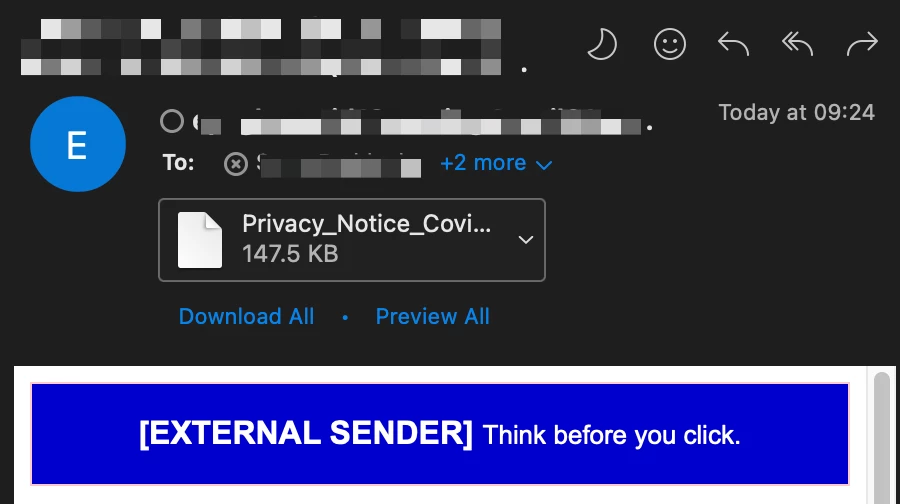
PDF Icon missing from Apple Mail & Outlook (Mac OS 13 - Ventura)

  • October 28, 2022
  • 34 replies
  • 33631 views

See the below image, this is the same in both Outlook & Apple Mail, this happens when I both receive a PDF or compose an email and attach a PDF, and the icon shows a blank page. 


I have attempted to uninstall Adobe Acrobat and then reinstall it. 

I have set Adobe as the Default and went to "Change All"

I even attempted setting it to preview and then back to Adobe but still get this issue of not being able to easily determine the file type. 
 

This topic has been closed for replies.

34 replies

NDC503
Participant
February 15, 2023

I don't think it is an Adobe problem.  I use a different pdf app and have the same problem.  It's the Mac OS or Mac Mail app.

ScottR28Author
Participant
February 9, 2023

I don't know how many updates I have installed to Microsoft & Adobe on my MBP since I originally posted this, however, the problem still persists!

Is anyone at Adobe aware of the issue? Surely it can be classed as a security vulnerability, as if I don't see what the file type is by icon, I could potentially open a malicious file.

Participating Frequently
February 9, 2023

This problem has not been solved.  I too have spoke to Adobe and Apple.  There have been 2 apple updates and 1 Adobe and neither have touched this problem.  

Participating Frequently
February 9, 2023
Adobe is aware; I have sen information to them and it was acknowledged. Apple doesn’t play nice with other people’s software, and they clearly do not care to fix the issue.

--
Hillary Hutchinson
hillaryhutchinson@mac.com
susanh94562257
Known Participant
January 19, 2023

Yup me too. Just updated to Ventura today. Only happens with multi-page documents.

Files seem to be OK on receiver's end, but it looks unprofessional.  

So as far as Apple's response that it's Adobe's fault, I'm going to say BS. I seem to recall this was an issue a few years ago (5, 6, 7 years ago?) with another upgrade.


Participating Frequently
March 29, 2023

if I use outlook web I have no problems, but on my mac both outlook desktop and mail apple have the same problem and it has now been 5 months without any solution

Participating Frequently
January 14, 2023

I had same problem, Outlook web mail works fine all icon are there, while outlook desktop had similar issue no icon for of or word or excel attachments after installing venture 13.1 

Participating Frequently
January 16, 2023

I've contacted Apple support, and they said it is a third-party problem; Adobe and Microsoft declined to say it's an Apple problem. Chicken and eggs 

Participant
January 5, 2023

Same for PDFs. Please fix. Don't like to look unprofessional with blank icon.

Nijssen Media
Participant
November 30, 2022

I have the same issue. Adobe is up-to-date, so is Outlook. macOS Ventura 13.0.1.

Nijssen Media
Participant
November 30, 2022

By the way... all other extensions are also shown as a blank icon without a preview (JPG, EPS, PDF, PNG, etc.)

Participant
November 29, 2022

Any solution so far?


Participating Frequently
November 29, 2022

I haven't seen any fix for this; appears to be Ventura problem.

Participant
November 28, 2022

Still not working for me, either. So annoying. 

I also have had recipients say that my files are zipped on their end yet they're showing as a PDF on mine. 

Participant
November 21, 2022

Same issue with adobe pdf attachments in outlook mail with ventura

Participant
November 15, 2022

Also same issue here. Very frustrating