
Participant
February 25, 2009
Answered

PDF Icons used to Show Preview of Document - Now it shows PDF Icon

  • February 25, 2009
  • 17 replies
  • 207310 views
I am using Adobe Acrobat 8 on a 64bit Windows Vista Home Premium Operating System. I just bought this computer and installed Adobe Acrobat 8 on it. On my other two computers (one vista, one xp) the normal Adobe Acrobat File Icons are changed to show a preview of the first page of the document. I work a lot with long lists of Pdf files, and the preview feature has been a great help. I am wondering if there is a setting on my new computer that I need to change to replicate this function that I have been enjoying on my other two computers.
This topic has been closed for replies.
Correct answer lisa_annd37346468

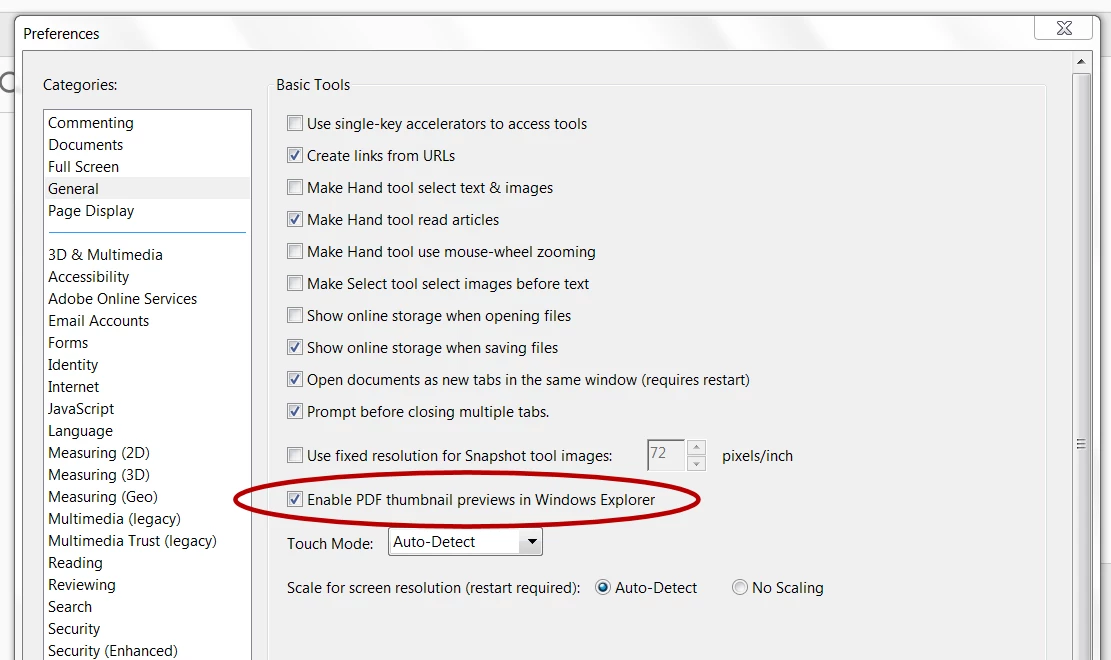
Hello All. I had the same issue. I am using Windows Home Premium with Service Pack 1. All I did to get the preview of my pdf files was to Open Acrobat Reader PC / Edit / Preferences / General - I then checked the box to "Enable PDF thumbnail previews in Windows Explorer" save your settings let Acrobat Reader do what it needs to do. (this only takes a few seconds) and that is it you will now have your previews.

17 replies

Participant
March 3, 2009
I am running in WinXP, but if I change my view to thumbnails, it will give me a first page preview on a multi-page pdf. But only for scanned PDFs, not for PDFs printed from another program.
Participant
March 3, 2009
Single page or single spread PDFs will display a preview in an e-mail client or web browser, but I've never seen multipage PDFs with preview that way.
Participating Frequently
March 2, 2009
I have the same issue,.. I am using Vista Home Premium 64bit edition, and Adobe Acrobat 9
Participant
March 2, 2009
This problem take place in Windows Explorer and Acrobat. If I try and access my PDF files from explorer or by opening my files in Acrobat - the same problem persists. For instance if I go to my computer and then navigate to my documents which contains a pdf file, when I look at the file, If says PDF Adobe with their image, and contains no preview of the document itself. XP is not the 64-bit version.
Participating Frequently
March 2, 2009
Is this in Acrobat or the Windows Explorer? Is XP also the 64-bit version?

Sanctus
Participant
March 2, 2009
I have not received a reply to this problem, I just posted last week - hopefully somone will know the answer
Participating Frequently
March 2, 2009
Did you ever find an answer to this?? I have been having the same problem, and nobody knows what I am talking about....

Thanks.