The Preflight screen here is from Acrobat Pro DC, but the terminology should be similar in XI (at least it was in Acrobat Pro 9).
For professional printing you should choose X-4. 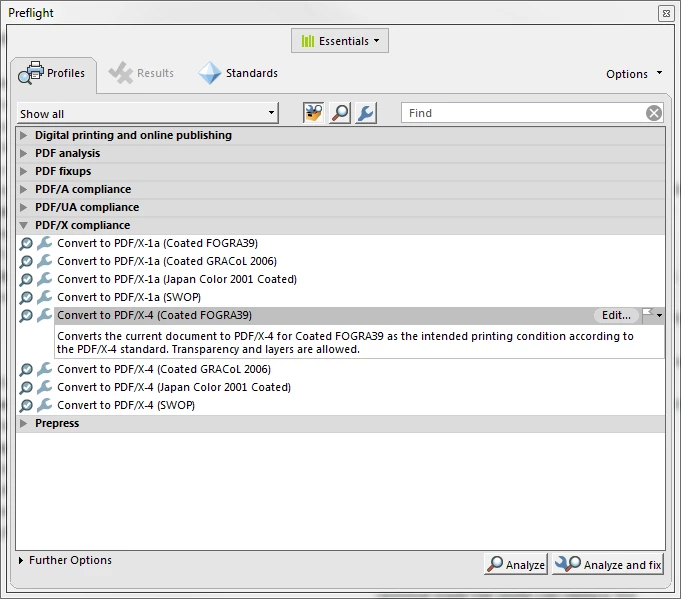
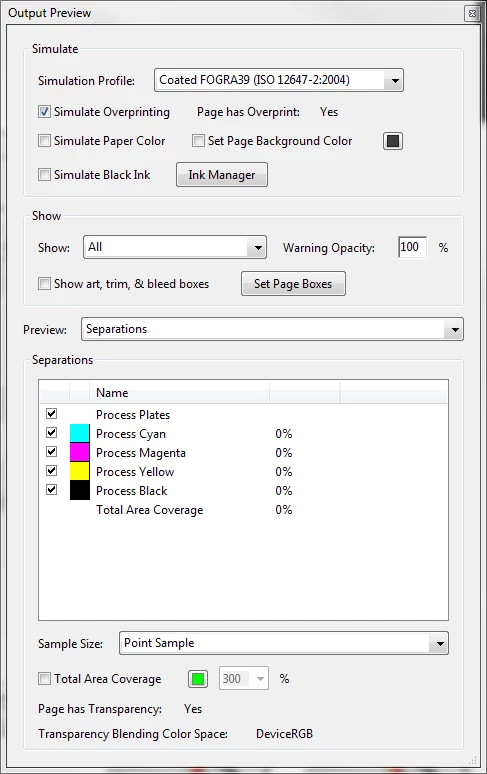
You may also look at the plates to see if the file has been properly separated. As I do have no experience with pages, I have some with Word and I know that at the time word did a poor job in CMYK separation. All black should be only black and no mixed CMY and K colours.
Printer marks are ok, but pretty senseless, if you do not design borderless. If you design borderless, you need to add bleed. The bleed area is trimmed away after printing, giving the impression of "borderless" printing. There the print service provider needs a clue about how much the bleed is. That's done with the trim marks, but there is generally also an information stored with the PDF. I suppose that modern imposition systems (the printer's program to prepare your print file for the actual print) take that information to apply trimming marks.But I'm not a printer and have little to none experience here.
The most important information, however, will come from your print service provider. If you do not use a discounter, they normally provide good advice.
Tot ziens.
BTW: I need to correct a small mistake in my former message. I misstated that x-1a were for archiving. x-1a is also for print, and should be OK for your printer. The Archiving standard is called PDF/A.


 AdChoices