Participant
February 26, 2019
Answered

PDF opens in Illustrator instead of Acrobat

  • February 26, 2019
  • 5 replies
  • 12813 views

Ever since updating to CC 2019 whenever I export file as PDF from InDesign it appears as an Illustrator PDF file. Also, whenever opening a PDF from someone else from my desktop or email it opens up Illustrator to view it instead of Acrobat.

Doing everything as I always have. Tried changing some settings, but still keeps happening.
This topic has been closed for replies.
Correct answer gary_sc

Hi PDCO1234,

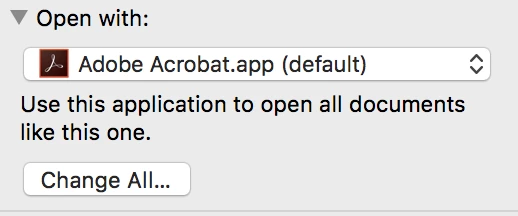
OK, this is essentially the same thing as in Windows. Click on any pdf in the Finder and do a Command-i (as in "info'), a widow will pop up to the left side of the screen. Just below half way you'll see a strip that says "Open With"

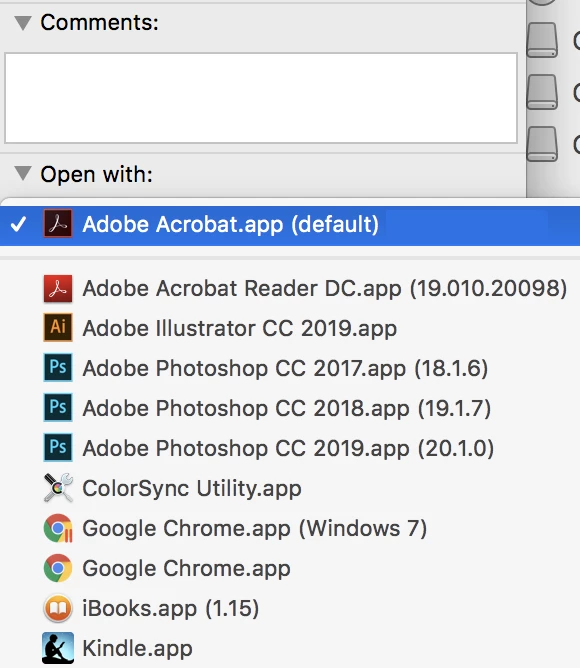
Click on that and a dropdown menu will show all of the apps that "could" open that Press on that and select Acrobat

Then, to make sure this is consistent from now on, once the dropdown menu is out of the way, click on the Change All... button. After doing that a small window will pop up asking to confirm your choice, click Yes.

Please let us know if this solves your problem.

5 replies

Participant
March 3, 2024

Helo to everyone, 

Can anyone help on the following? 

How can we turn a 4color pdf to

Black+spot color pdf in illustrator? 

Thanks from the beginning

Participant
January 22, 2020

When I open the Get Info, the default program is already Preview for me, but for some reason the file is still associated to Illustrator. It even has the Ai icon where it shows the file type/what it opens with. This only started happening when I exported a PDF as Interactive instead of print and now it always saves it as an Illustrator file. Do you have any idea how to fix it? Thanks

Participating Frequently
March 17, 2020

I am having this same problem with PDFs created in Acrobat, or edited in Acrobat. I have tried changing the "open with" options several times. I am in the same position as eqiao. Any ideas? Is there some setting in Acrobat that's causing this?

Legend
March 17, 2020

It isn't a setting in Acrobat or Illustrator or any app. It's a setting in macOS. They are all PDFs, do you really care what the icon and description are?

Participant
January 13, 2020

This only works for one document.  If you hover over the PDF document you want to open then click GET INFO > then gto to Open with and if the default is not Adobe Acrobat you can scroll until you find it.  Then hit the Change All button below and it will change the default back to Acrobat so you don't have to do the above for each and every PDF --- If you want them all to open up in Adobe Acrobat.


SandNotOil
Participant
January 13, 2020

Thank you for this, it's been driving me mad for a while now.

Dave__M
Community Expert
Community Expert
February 26, 2019

Is this on a Windows machine or Mac?  In Windows, sometimes default program settings get messed up with updates.  I have to fix these things periodically.

If Windows:

Right-click a PDF, and choose Open With, and browse for Acrobat, and enable Always use this app...

I hope this is helpful.

My best,

Dave

pdco1234Author
Participant
February 26, 2019

No, I am working on a MAC.

gary_sc
Community Expert
gary_scCommunity ExpertCorrect answer
Community Expert
February 26, 2019

Hi PDCO1234,

OK, this is essentially the same thing as in Windows. Click on any pdf in the Finder and do a Command-i (as in "info'), a widow will pop up to the left side of the screen. Just below half way you'll see a strip that says "Open With"

Click on that and a dropdown menu will show all of the apps that "could" open that Press on that and select Acrobat

Then, to make sure this is consistent from now on, once the dropdown menu is out of the way, click on the Change All... button. After doing that a small window will pop up asking to confirm your choice, click Yes.

Please let us know if this solves your problem.