
Participant
June 6, 2025
Answered

PDF Portfolio "Description" column is always blank, how to use this column?

  • June 6, 2025
  • 2 replies
  • 588 views

We have very long filenames so the description column would be pretty handy to let people know which doc is which considering they all start with job number and client name and look the same when truncated in the "Name" column


How do I edit the Description column, I tried entering text in all of the meta data fields I could find, none of them showed up in the portfolio document list


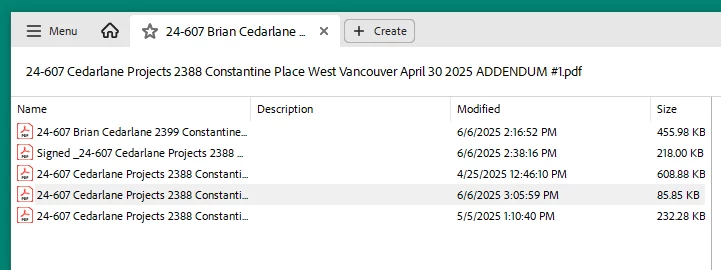
In the picture below I would like the Description column to read as:

CONTRACT

BID SUBMISSION

SPECIFICATION

ADDENDUM #1

ADDENDUM #2


Correct answer try67

Copying the data from the file is a bit tricky, but setting it manually can be done using a script. Go to Details View, making sure no file from the Portfolio is open (click on a blank spot in the files list to close the currently open file), and run this code from the JS Console:

this.dataObjects[0].description = "CONTRACT";
this.dataObjects[1].description = "BID SUBMISSION";
this.dataObjects[2].description = "SPECIFICATION";
this.dataObjects[3].description = "ADDENDUM #1";
this.dataObjects[4].description = "ADDENDUM #2";


Not ideal, but it works...

2 replies

try67
Community Expert
try67Community ExpertCorrect answer
Community Expert
June 6, 2025

Copying the data from the file is a bit tricky, but setting it manually can be done using a script. Go to Details View, making sure no file from the Portfolio is open (click on a blank spot in the files list to close the currently open file), and run this code from the JS Console:

this.dataObjects[0].description = "CONTRACT";
this.dataObjects[1].description = "BID SUBMISSION";
this.dataObjects[2].description = "SPECIFICATION";
this.dataObjects[3].description = "ADDENDUM #1";
this.dataObjects[4].description = "ADDENDUM #2";


Not ideal, but it works...

Participant
June 13, 2025

So I tried to tackle this today, I have figured out how to enable the JS Console and open it but when I enter your script I don't see any change. Is there a RUN button or something that I am missing?

this is what I am looking at:


try67
Community Expert
Community Expert
June 13, 2025

To run the code select all of it with the mouse or keyboard and press Ctrl+Enter.

Dave Creamer of IDEAS
Community Expert
Community Expert
June 6, 2025

Unfortunately, I think you have to enter the text while in portfolio list view. It would make too much sense to pick up the document properties info. Hopefully, someone can post and correct me.


David Creamer: Community Expert (ACI and ACE 1995-2023)
Participant
June 13, 2025

This was my guess as well but I have just tried to make another portfolio and saw no option for this while creating the document.