
kelvinl73761330
Participant
January 9, 2018
Answered

PDF prints blank page

  • January 9, 2018
  • 2 replies
  • 19753 views

Hi,

Since Adobe Reader 11, it is printing our CAD to PDF A3 prints (which has background aerial images or complex CAD layers) to blank page from Ricoh Aficio series printers using Ricoh's PCL6 driver for Universal Printing.  The prints only work when printing in Adobe Acrobat DC or Foxit PhantomPDF or selecting 'Print As Image" in Adobe Reader 11.

Could Adobe Support please advise if it is a bug in Adobe Reader 11?  We cannot afford to have all users installed Adobe Acrobat DC nor using "Print As Image" option as the quality of print using this option is different from direct printing.

Thanks,

Kelvin
This topic has been closed for replies.
Correct answer Meenakshi Negi

Hi Kelvin,

As you are experiencing issues in printing files from Adobe Acrobat Reader 11, please try the troubleshooting steps mentioned over here Troubleshoot PDF printing in Acrobat and Reader

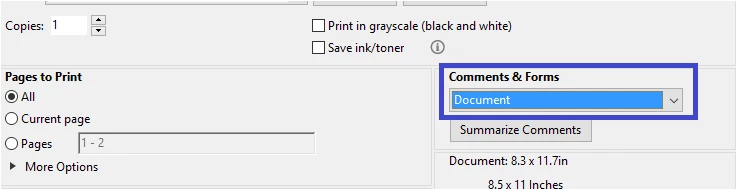
Also, please make sure that the right option is selected under the "Comment & Forms" drop-down menu in the Print window.

You can also try once updating the application to the latest version, that is Adobe Acrobat Reader DC.

Then check if you can print file without any issue with this version.

If you still experience the issue, please share the following information:

- OS version installed on your machine.

- Do you get this error with all files or with some particular one?

Let us know how it goes.

We will be waiting for your response.

Regards,

Meenakshi

2 replies

Participant
August 20, 2018

I am facing the same issue. What was the solution?

Abambo
Community Expert
Community Expert
August 20, 2018

As you see, there was no answer to my question. So it slept until you showed up (I personally did not see Joit 's message)

  wrote

I am facing the same issue. What was the solution?

Using Reader XI?

ABAMBO | Hard- and Software Engineer | Photographer
Participant
August 20, 2018

Adobe Acrobat Reader DC version 2018.011.20040

Meenakshi Negi
Community Manager
Meenakshi NegiCommunity ManagerCorrect answer
Community Manager
January 9, 2018

Hi Kelvin,

As you are experiencing issues in printing files from Adobe Acrobat Reader 11, please try the troubleshooting steps mentioned over here Troubleshoot PDF printing in Acrobat and Reader

Also, please make sure that the right option is selected under the "Comment & Forms" drop-down menu in the Print window.

You can also try once updating the application to the latest version, that is Adobe Acrobat Reader DC.

Then check if you can print file without any issue with this version.

If you still experience the issue, please share the following information:

- OS version installed on your machine.

- Do you get this error with all files or with some particular one?

Let us know how it goes.

We will be waiting for your response.

Regards,

Meenakshi

kelvinl73761330
Participant
January 9, 2018

Hi Meenakshi,

We have tried using Adobe Reader DC and your suggestions that we still experience the same blank prints issue printing to A3 paper output, printing to A4 paper output from PDF seems fine.  We use Windows 7 64 bit Enterprise.

In summary,

What don't work:

- printing any PDF's with background aerial images or complex CAD layers to A3 paper output from Ricoh Aficio using PCL6 drivers using both latest version of Adobe Reader XI or Adobe Reader DC

What works:

- printing any PDF's with background aerial images or complex CAD layers to A4 paper output from Ricoh Aficio using PCL6 drivers using Adobe Reader XI and Adobe Reader DC.

- printing any PDF's with background aerial images or complex CAD layers to A3 paper output from Ricoh Aficio using PCL6 drivers using Adobe Reader X, latest Adobe Acrobat DC or Foxit PhantomPDF.

- printing any PDF's with background aerial images or complex CAD layers to A3 paper output from HP Designjet T2300 plotter using both HPGL or PS drivers.

We need to print to A3 paper output from Ricoh Aficio using PCL6 drivers using Adobe Reader XI.  We do have the choice to install Ricoh PS drivers as not all Ricoh Aficio printers in the office have such capability.  We cannot afford to have all users using Adobe Acrobat DC or Foxit PhantomPDF.  We cannot roll back to using Adobe Reader X.  We cannot just print to A4 paper output using Adobe Reader XI.  Not everyone has access to HP Designjet T2300 plotter in our office.  We do not want to use the "Print as image" option every time when printing as the quality is different.

I can send some PDF's over to test, let me know your private email address or other way of uploading the files.

Thanks,

Kelvin

maratovich
Participating Frequently
January 10, 2018

Try setting the flip in the printer settings = 180