Participant
April 2, 2025
Answered

PDF's download on Chrome no longer open automatically in Acrobat Pro

  • April 2, 2025
  • 1 reply
  • 1040 views

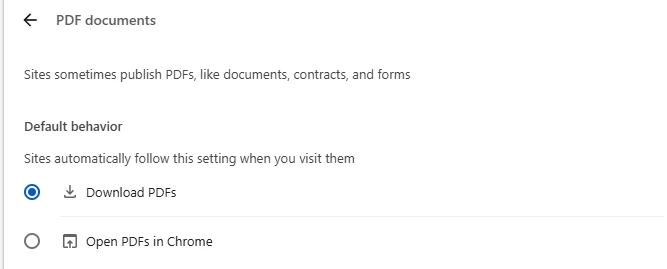
Until recently, when I download PDF's in Chrome they would automatically open in Acrobat Pro (which I need).  This is no longer the case.


I'm running Acrobat Pro version 2025.001.20435 64 Bit


My Chrome is version 135.0.7049.42 (Official Build) (64-bit)


Correct answer creative explorer

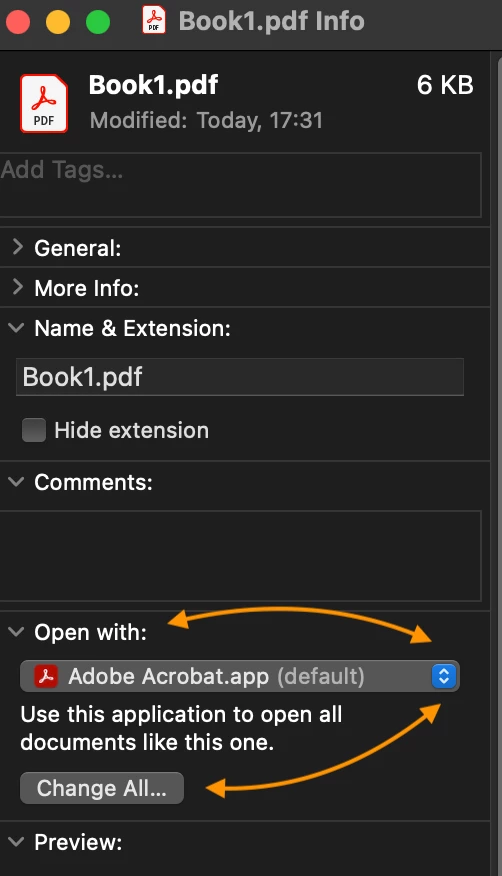
@PromoJohn that looks about right.... I would also take it one more step. On a MAC, Command I to 'Get Info,' and where it says: Open with:, make sure that says Adobe Acrobat and 'Change All' to Adobe Acrobat as well:


For a PC, it's Right-Click - Go to Open with - Choose Adobe Acrobat Pro and check that box that says 'AAlways use this app to open PDF files. And then click OK!  


1 reply

creative explorer
Community Expert
creative explorerCommunity ExpertCorrect answer
Community Expert
April 3, 2025

@PromoJohn that looks about right.... I would also take it one more step. On a MAC, Command I to 'Get Info,' and where it says: Open with:, make sure that says Adobe Acrobat and 'Change All' to Adobe Acrobat as well:


For a PC, it's Right-Click - Go to Open with - Choose Adobe Acrobat Pro and check that box that says 'AAlways use this app to open PDF files. And then click OK!  


m
PromoJohnAuthor
Participant
April 4, 2025

This has been done and it still doesn't work.  I'm on a PC.

creative explorer
Community Expert
Community Expert
April 4, 2025

@PromoJohn that should have worked? I wonder if it's a permission issue then. Your user account might not have the necessary administrative privileges to make system-wide changes to file associations. Try running File Explorer as an administrator. Search for File Explorer in the Start Menu >  right-click > select Run as Administrator. Then, try the "Open with" method again.

m