Question
pdf saveas tiff/bmp problem
Does anybody know if there is setting to fix this problem of mine when saving pdf as tiff/bmp.
Application Version : Acrobat Pro XI/Acrobat Pro DC 2017
1. open a pdf file with text as outline.
2. saveas pdf to tiff
3. change tiff setting resolution to 300dpi
4. continue with saving as tiff
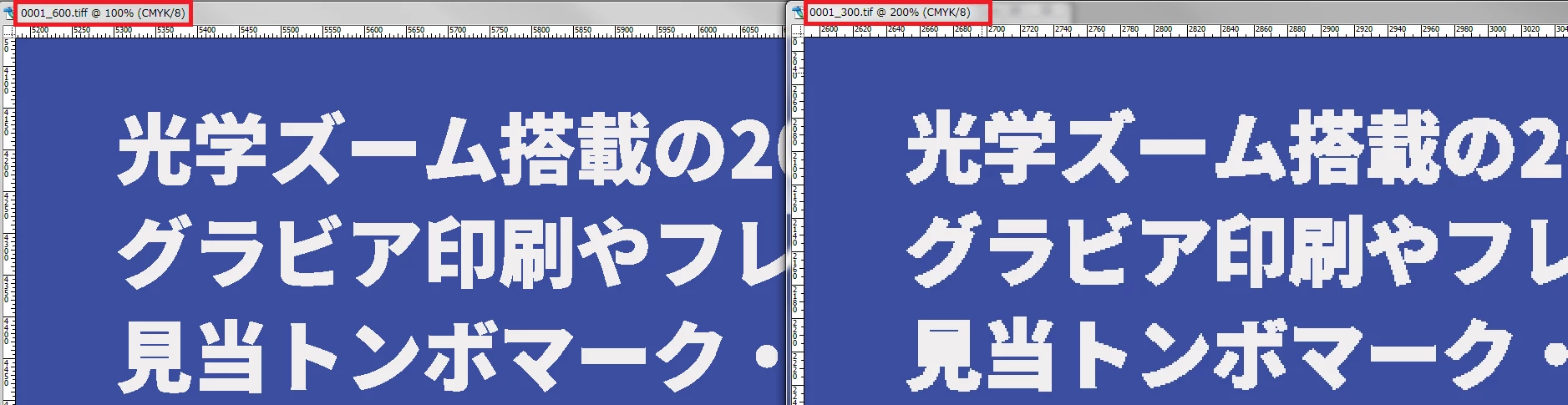
after examining the saved tiff file carefully, some text (japanese fonts) with 1-2px space will look like it is being filled by the color of the text. looks like anti-alising is not performed during saveas, hence the filled effect.
Note: the problem disappear when the pdf is exported in 600dpi
Side by Side Comparison of text
Any help would be appreciated.
 AdChoices