
Participant
April 13, 2023
Question

PDF Showing Up Differently for Customer

  • April 13, 2023
  • 1 reply
  • 745 views

I created this PDF in InDesign and saved out as an interactive PDF.

It looks fine on my end:
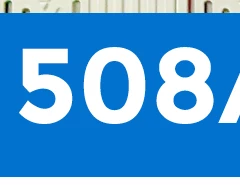
But when my customer opens it, it looks like this:
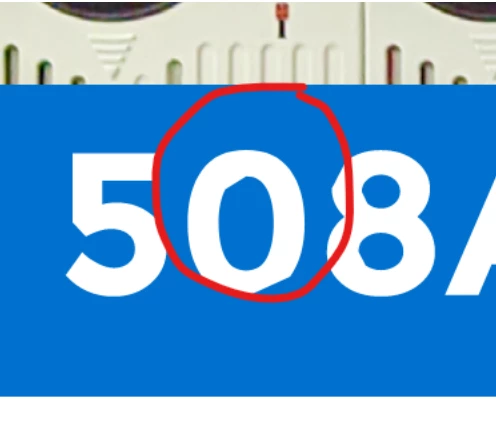
(I'm referring to the lines in the numbers... he added the red circle)

Why is this happening??? 

This topic has been closed for replies.

1 reply

Abambo
Community Expert
Community Expert
April 16, 2023

What are the OS systems? Acrobat versions? Font used?


What happens when you use a third computer to test the display error?

ABAMBO | Hard- and Software Engineer | Photographer
VerelleAuthor
Participant
April 17, 2023

I'm on a Mac OS Monterey. Latest Acrobat (cloud). Font is Montserrat.

I'm not sure what OS the customer is on, presumably a PC. I'm mostly concerned that it's not WYSIWYG, which I expect from a PDF. I really have no control of anything from the clients end, and find it disoncerting that it's showing up differently since I'm not there to preview it. 

I've worked around it by outlining the headlines, but I find this an inadequate solution since I prefer text to be live in case they want to copy and paste something from the document.