

Abu Rahat Sabir
Participant
August 28, 2024
Answered

PDF to JPG Conversion Issue in Adobe Acrobat - Files Not Saving or Disappearing

  • August 28, 2024
  • 1 reply
  • 661 views

Solution: Disabling Protected Mode to Resolve PDF to JPG Conversion Issue

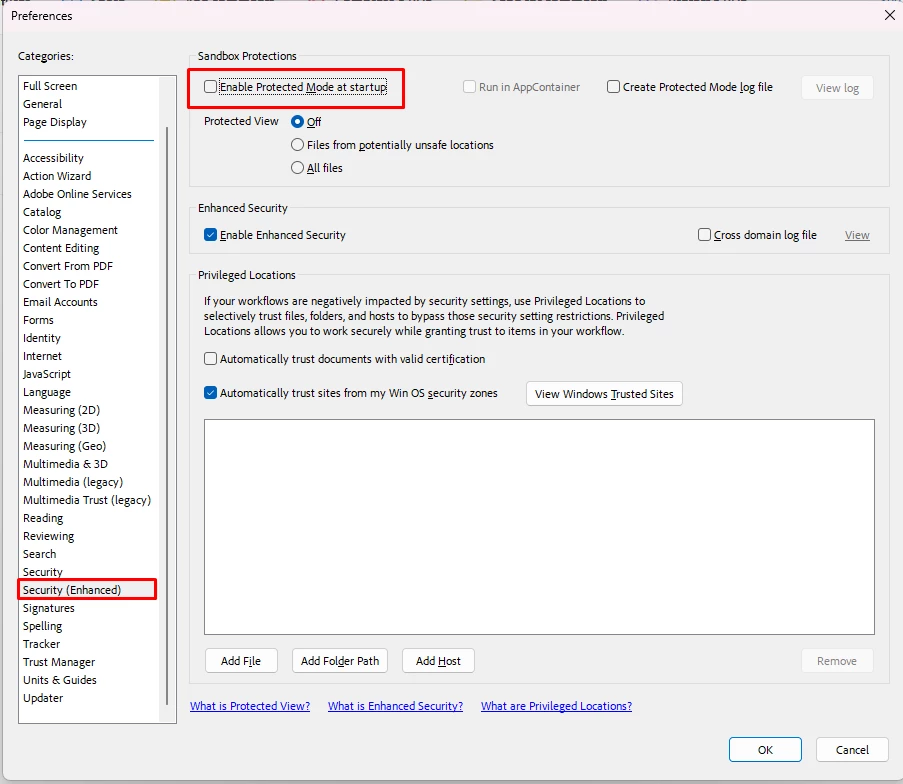
After some investigation, it seems the issue might be related to a setting in the Security (Enhanced) tab in Adobe Acrobat. Here's how you can resolve it:

  1. Open Adobe Acrobat.
  2. Go to Edit/Menu > Preferences.
  3. Navigate to the Security (Enhanced) tab.
  4. Uncheck the box labeled Enable Protected Mode at startup.
  5. Click OK and restart Acrobat.

This should allow the PDF to JPG conversion process to complete successfully. I hope this helps anyone else facing the same issue!

Abu Rahat Sabir
Correct answer Souvik Sadhu

Hi @Abu Rahat Sabir,


Hope you are doing well.


Thanks for sharing a helpful solution. I am marking my response as correct here, so any future user with the similar query will see this post appear at the top for their search.


Thanks again for working towards a healthy community.


-Souvik

1 reply

Souvik Sadhu
Community Manager
Souvik SadhuCommunity ManagerCorrect answer
Community Manager
January 21, 2025

Hi @Abu Rahat Sabir,


Hope you are doing well.


Thanks for sharing a helpful solution. I am marking my response as correct here, so any future user with the similar query will see this post appear at the top for their search.


Thanks again for working towards a healthy community.


-Souvik