Participant
July 30, 2018
Question

PDF to TIFF no longer compresses

  • July 30, 2018
  • 1 reply
  • 2577 views

Hello!

I used to be able to save as PDF to TIFF and the resulting TIFF would be compressed with CCITT T.6.

I received a PDF that contained a few color pages. The program I use the tiffs in does not accept color files, so I adjusted one of the grayscale settings to see if it would help ( I cannot even remember what I did, however, it did not work, anyway). I then changed my settings back (I saved my settings in a screenshot before the change). Now my converted files are uncompressed and I cannot get them to compress again. The program I use the tiff files in will not accept them, and they are huge.

Here are my settings:
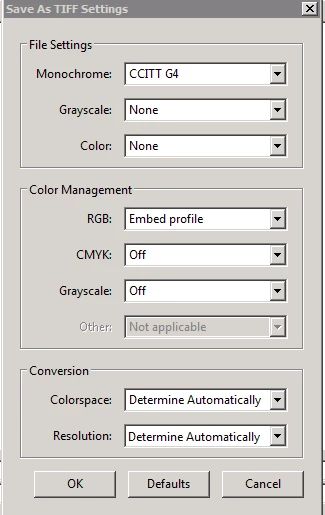
It is like Adobe Acrobat Pro is ignoring my settings.

Anyone have any idea?

JB

This topic has been closed for replies.

1 reply

Dov Isaacs
Legend
July 30, 2018

Looking at your conversion settings, you are explicitly telling Acrobat not to compress grayscale. Your setting for Grayscale compression is Off.

Try the following:

          - Dov

- Dov Isaacs, former Adobe Principal Scientist (April 30, 1990 - May 30, 2021)
Jboc13Author
Participant
July 30, 2018

Thank you for your reply.

I tried that. While it is smaller, it still does not show it is compressed, and failed in my program. It did not even allow me to pull it into my program.

Believe it or not, I was able to compress my files with the Grayscale and Color Compression settings set at "None" prior to playing with it.

I was able to find a suggestion online that worked. I updated the Convert to PDF setting for TIF for the Monochrome from JBIG2 to CCITT G4, and that did the trick. Not sure why. I am not going to question it.

Janet Brown