
Participating Frequently
November 1, 2019
Answered

PDFs display incorrectly

  • November 1, 2019
  • 2 replies
  • 16887 views

For several months now, I've been having an issue with Acrobat DC. It started when I updated CC to 2018 and is still present with CC 2019, and involved PDFs created mostly from InDesign and sometimes Illustrator.


My problem is that the vector colors in the PDF often do not show as anything but white when I open it in DC.

It usually happens when there are transparencies or gradients present in the file, but hte white areas should be solid color.

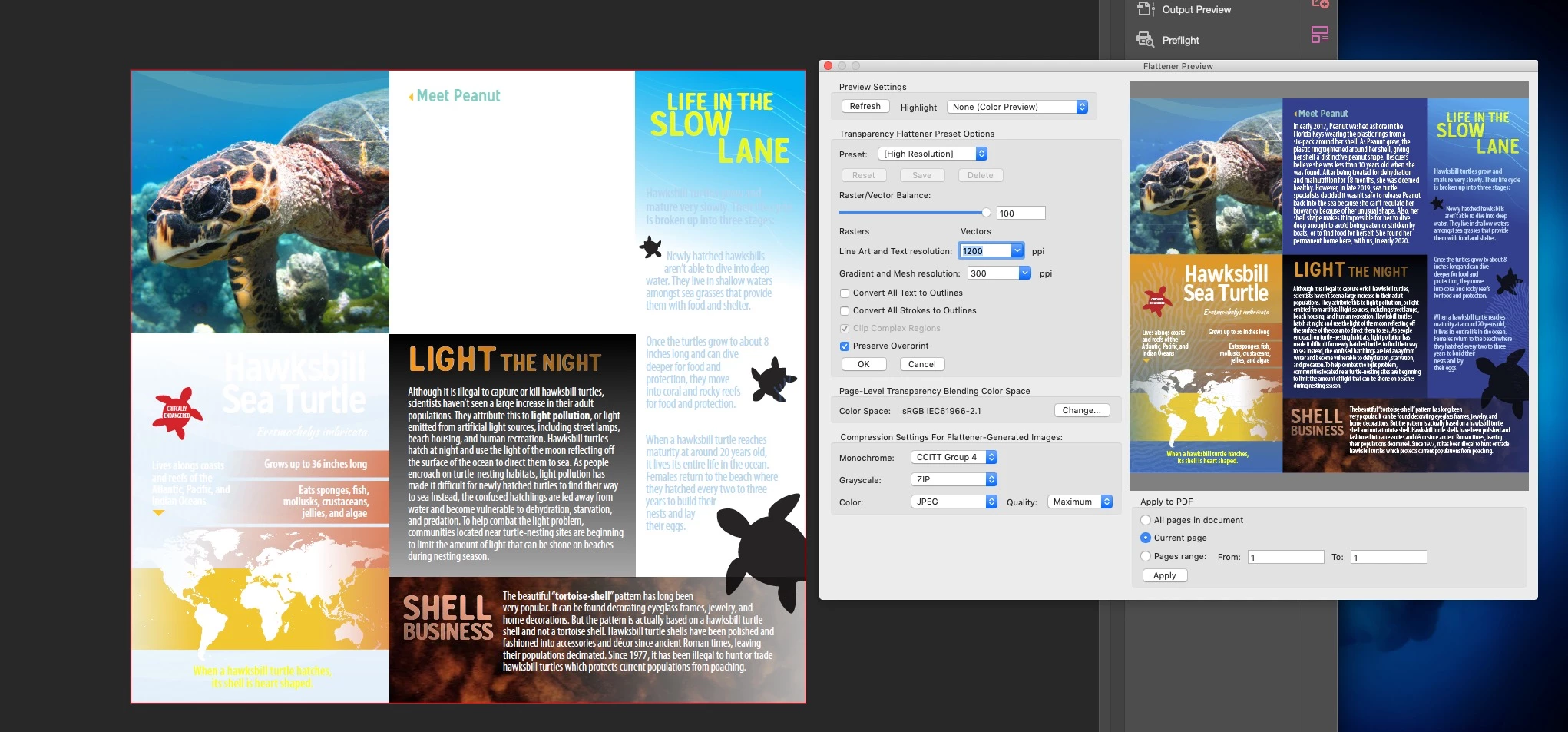
I've read that Acrobat might not support certain transparency blending modes, but I want to point out that it was working fine with pre-Acrobat DC versions, and the fact that all my coworkers can open the same PDF without any issues—it is only effecting mine. Oddly, the PDF will appear correctly in the Flattener Preview, so I know it's built OK. When I send the same PDFs to others, everyone else can view it corretly, in Acrobat DC Reader and Pro.


My department works on Macs running Mojave (10.14), and we are currently using CC 2019. 

I've tried unistalling and reinstalling Acrobat DC.

I've tried deleting preference files and resources.

I've tried changing my monitor profile, Acrobat's display preferences, and even Apple's HDD first aid. 

Nothing has worked yet, so I'm open to further suggestions. 


Attached is a example of what's going on. On the left is how Acrobat opens it, and the right side is the Flattener Preview. I placed a vector solid blue background in the back, and it's not showing up. (I always convert any spot colors to process, so it shouldn't be that.)
This topic has been closed for replies.
Correct answer gd247

I am on Mojave as well and just fixed it!  Instead of uninstalling from the Creative Cloud interface, I opened the Acrobat DC folder on my HD and used the Uninstaller from there, then went back to CC and clicked uninstall there as well (which finally worked); then re-installed the program and voila — my PDFs are displaying properly again. Hope this solves it for you too!

2 replies

Inspiring
July 28, 2020

I have been having this exact issue for months. This happens even when colors are not used with transparency ... a simple cmyk build will show up as white in Acrobat. But if my client opens the file they can view it correctly, and when I open up the file with Safari browser it views correctly there too.


I tried uninstalling Acrobat DC but every time CC says "Uninstallation Failed" so I can neither start fresh nor find a solution for this issue.


Anyone have a solution yet?

rtistdAuthor
Participating Frequently
July 28, 2020

I still haven't resolved mine. The repair tools didn't help yet. I'm still on OS Mojave, so I'm hoping a fresh OS install and CC install might fix it, but that probably won't happen until after this pandemic, with some time with my IT dept. I'm still relying on others to QC my PDFs, which is a less than ideal situation, considering what is paid for subscription access (sorry, venting frustration). I'd feel better if we could back-install Acrobat 9 from the CC, just to try out what may have been corrupted.

gd247Correct answer
Inspiring
July 28, 2020

I am on Mojave as well and just fixed it!  Instead of uninstalling from the Creative Cloud interface, I opened the Acrobat DC folder on my HD and used the Uninstaller from there, then went back to CC and clicked uninstall there as well (which finally worked); then re-installed the program and voila — my PDFs are displaying properly again. Hope this solves it for you too!

rtistdAuthor
Participating Frequently
November 1, 2019

I should also add that it doesn't matter if I'm creating an interactive/RGB PDF or a print/CMYK version, it is present in any PDF, and could happen on any or every page of a multipage PDF.

ls_rbls
Community Expert
Community Expert
November 2, 2019

Please review the following link and see if the issue is related to standards applied to the document or PDF conversion settings


https://helpx.adobe.com/acrobat/using/pdf-conversion-settings.html#adobe_pdf_conversion_settings 

rtistdAuthor
Participating Frequently
November 4, 2019

Thanks, but as far as I can tell it doesn't have to do with the setting to make the PDF. These PDFs open and preview correctly on other Macs and PCs. This seems to only be affecting my normal viewing of them. Oddly, it seems to consistently affect the color object on the bottom of the stack/bottom layer (which changes the paper color), and any gradient or object of the same color. 


To confirm this, I just retested saving an Illustrator file as a PDF, using different presets (standard and custom) and also changing the color of the objects that weren't showing up and saving (from PMS to process or RGB), and no success. Attributes are normal (no overprint or knockout), and nomal 100% blending/transparency.


PDFs open and view fine in my internet browsers...this is affecting my Acrobat software specifically. So, short of trying to reinstall an older version of Acrobat (pre-DC), I'm at a loss.


Any more ideas, or something specific?